BenQ vs LG Monitors: Which Brand to Buy? (November 2026)
For most work desks, a BenQ monitor wins on eye-care and connection choice, while LG wins when you want a wider screen or faster refresh. In this BenQ vs LG monitor comparison, the BenQ GW2490 takes the overall pick for a standard office setup.
On this page (8 sections)
- BenQ vs LG monitor: which brand fits your desk?
- How much desk space does each brand need?
- Which connections suit your devices?
- How do the panels and color compare?
- How do refresh rates affect daily work?
- Which eye-care features matter most?
- Which brand should you buy for your setup?
- Verdict: is BenQ or LG the better monitor brand for you?
For most work desks, a BenQ monitor wins on eye-care and connection choice, while LG wins when you want a wide screen or faster refresh. In this BenQ vs LG monitor comparison, the BenQ GW2490 takes the overall pick for a standard office setup.
The real differences between the brands show up in port counts, refresh rates and the extra features each one adds for long screen hours.
This comparison looks at two BenQ models and two LG models, then narrows the choice to the setups each brand serves best.

BenQ vs LG monitor: which brand fits your desk?
BenQ fits a compact, eye-care-focused office desk; LG fits a wider or faster screen for multitasking and light gaming. Your desk width and the devices you connect decide more than the badge on the bezel.
BenQ's pair here are 24-inch and 23.8-inch 1080p screens. LG's pair start at 27 inches and reach 32 inches, so LG covers more desk.
BenQ leans on low blue light and flicker-free tech across its line. LG leans on thin borders, higher refresh rates and its own reader and split-screen tools.
Where BenQ leads
BenQ puts eye-care features front and center. The GW2490 and GW2491 both carry BenQ's low blue light filtering and flicker-free backlight.
Both BenQ screens also offer DisplayPort alongside HDMI. That gives you a second connection type for a desktop tower while an HDMI port stays free for a laptop.
BenQ also builds speakers into the GW2490, which keeps a compact desk free of add-on audio gear. The GW2491 leaves speakers out, so pair it with a headset if you take lots of calls.
Where LG leads
LG's 27U411A-B brings a 120Hz refresh rate and a 1ms motion blur reduction mode. Its three-side borderless design keeps dual screens looking close to continuous.
The LG 32MR50C-B adds a 32-inch curve and a 3000:1 contrast ratio. That contrast comes from its VA panel, which trades some viewing-angle consistency for deeper blacks.
LG's on-screen tools also go further. The 27U411A-B ships with the Switch app, which splits the screen into up to six sections for multitasking, and both LG screens add gaming aids like Dynamic Action Sync and Black Stabilizer.
How much desk space does each brand need?
LG needs more desk room because its screens are bigger, while BenQ keeps the footprint small for a compact home office. Measure width and depth before you commit, since both brands use stands that take up space behind the screen.
The BenQ GW2490 measures about 16 inches wide and 21 inches tall. Its depth is around 7 inches, so it sits well on a shallow desk.
The BenQ GW2491 measures roughly 21 inches wide and 21 inches tall. It weighs about 2.7 kg, so it's light enough to lift onto a shelf or arm.
The LG 27U411A-B measures about 24 inches wide and 18 inches tall. The LG 32MR50C-B is the largest at roughly 28 inches wide and 20 inches tall.
All four support wall mounting. That's useful if you want to free the desk entirely and hang the screen at eye level.
BenQ vs LG monitor in a small home office
A small desk favors the BenQ pair. A 24-inch screen leaves room for a keyboard, notebook and coffee mug without crowding.
The BenQ GW2490's built-in speakers help here too. You can take a video call without adding a separate speaker set to a narrow desk.
BenQ vs LG monitor in a wide dual-screen setup
A wide desk lets the LG 27U411A-B shine. Its thin borders reduce the gap between two screens, and the 27-inch size gives each window more room.
The LG 32MR50C-B works as a single wide screen instead of two. Its curve keeps the edges closer to your eyeline, so you turn your head less than on a flat 32-inch panel.
The LG 27U411A-B also tilts from -5 to 20 degrees on its slim stand, so you can angle it to match the screen beside it. Matching the tilt on both monitors keeps a dual pair comfortable over a long day.
Which connections suit your devices?
BenQ gives you more ports on the smaller models, while LG keeps connectivity simple with a single HDMI input on each screen. Count your devices before choosing, because swapping cables gets old fast.
The BenQ GW2490 has two HDMI ports and one DisplayPort. That lets you keep a desktop on DisplayPort and a work laptop on HDMI, then switch with its input hotkey.
The BenQ GW2491 has one HDMI and one DisplayPort. It's enough for a desktop plus a laptop, but there's no third input.
Both LG models here offer HDMI only. The 27U411A-B and 32MR50C-B each have a single HDMI connection.
If you run a laptop, a desktop and a games console, the BenQ GW2490 is the easier hub. Its two HDMI inputs mean fewer cable swaps during the week.
Does a DisplayPort matter for office work?
DisplayPort is handy when your desktop has that output and you want to keep HDMI free. It's also a common route to higher refresh rates on some graphics cards.
For a plain laptop-and-dock setup, HDMI alone covers the job. That makes the single-port LG models perfectly workable for most people.
One practical note: the LG 27U411A-B comes with an HDMI cable in the box, so you can plug it in the day it arrives. Plan for a cable on the BenQ pair if you want to use DisplayPort from the start.
How do the panels and color compare?
All three IPS models here keep colors stable from side angles and cover up to 99% of sRGB, while the LG VA panel trades angle consistency for contrast. Color accuracy matters for documents, photos and video calls.
The BenQ GW2490 and GW2491 both cover 99% of the sRGB color space. That means web pages, spreadsheets and casual photo edits show colors close to how they were designed.
The LG 27U411A-B also reaches up to 99% sRGB and adds HDR10 support. HDR10 gives brighter highlights and deeper shadows when the content supports it.
The LG 32MR50C-B uses a VA panel with a 3000:1 contrast ratio. Dark scenes look deeper, but colors shift more when you view from the side.
BenQ vs LG monitor panel by panel
The two BenQ screens and the LG 27U411A-B share the same base recipe: IPS, 1080p and 99% sRGB. From the front, a document or a video call looks much the same on all three.
The LG 32MR50C-B departs from that recipe. Its VA panel doubles the contrast of the IPS models, which helps dark video and games, at the cost of narrower viewing angles.
The BenQ GW2490, LG 27U411A-B and LG 32MR50C-B all sit at 250 nits of brightness. That's fine for a shaded room but not a sunlit window, so plan the desk position with glare in mind.
Which brand is better for photo and video work?
For color work, the IPS panels in the BenQ pair and the LG 27U411A-B are the safer starting point. They hold color better across the screen and from an angle.
The BenQ screens keep their color while filtering blue light, according to BenQ. That matters if you edit in the evening and want less eye strain without a yellow tint.
Which brand is better for watching video?
The LG 32MR50C-B suits movie nights better than the smaller screens. Its 32-inch curve and higher contrast fill more of your view with deeper blacks.
The LG 27U411A-B is the middle option. Its HDR10 support adds range to streaming content without the curve or the larger panel.
How do refresh rates affect daily work?
A 100Hz panel like BenQ's smooths scrolling and window dragging, while LG's 120Hz refresh goes a step further for fast motion. For most office tasks, the jump from 60Hz to 100Hz is the one you notice.
The BenQ GW2490 and GW2491 both run at 100Hz. Cursor movement and page scrolling feel cleaner than on a 60Hz screen.
The LG 27U411A-B runs at 120Hz and adds a 1ms motion blur reduction mode. That's useful if you game after work hours on the same screen.
The LG 32MR50C-B also runs at 100Hz. Its AMD FreeSync support keeps fast scenes smoother when paired with a compatible graphics card.
Refresh rate is only half the motion story. The BenQ GW2490 and GW2491 also list FreeSync support, so both brands handle tear-free motion on a compatible graphics card.
Is a higher refresh rate worth it for work?
For pure word processing and email, 100Hz is already comfortable. The extra 20Hz on the LG 27U411A-B matters more if you game or watch fast video.
If you split time between work and gaming, the LG 27U411A-B's 120Hz and FreeSync support make it the stronger all-round screen.
Which eye-care features matter most?
BenQ's low blue light and flicker-free tech are the core of its eye-care story, while LG offers its own reader mode and flicker-safe backlight. Both brands take long screen hours seriously, just with different tools.
BenQ's Low Blue Light Plus filters shorter blue-violet light while keeping colors vivid. Its flicker-free backlight removes the flicker that can cause eye strain at low brightness.
The BenQ GW2491 adds TUV certification and an ePaper Mode. ePaper Mode mimics a paper page for long reading sessions.
The LG 27U411A-B and 32MR50C-B both offer Reader Mode, which lowers blue light for reading. The 27U411A-B also lists a Flicker Safe backlight.
BenQ vs LG monitor for long workdays
For an eight-hour desk day, the BenQ pair's dedicated eye-care focus is the clearer match. Low blue light and flicker-free tech run alongside normal color work.
The LG models cover the basics too. Reader Mode and Flicker Safe make them comfortable for long sessions, even if the eye-care pitch is less central to the brand.
BenQ also ships its GW2491 with EyeSafe 2.0, a standard that lowers blue light while keeping vivid color. It's the most reading-focused screen of the four.
Which brand should you buy for your setup?
Buy BenQ for a compact office screen with strong eye care and more ports; buy LG for a wide or fast screen that fills your desk. The BenQ GW2490 is the best overall for most readers, and each LG model wins a specific need.
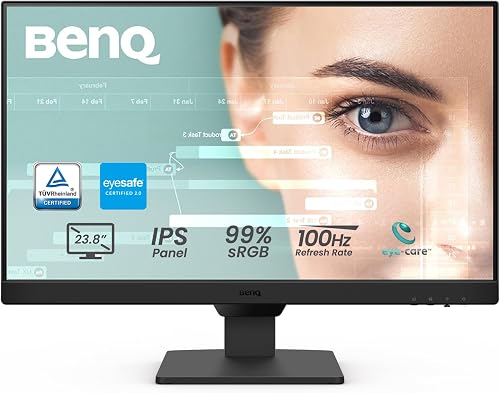
Pick the BenQ GW2490 if you want one reliable screen for work, calls and the odd video. Its 24-inch IPS panel, 100Hz refresh, speakers and three inputs cover a standard desk without extra gear.
Pick the BenQ GW2491 if your day is mostly reading and writing. Its ePaper Mode and TUV-certified eye care suit document-heavy jobs, and its 23.8-inch size leaves desk space free.
Pick the LG 27U411A-B if you run two monitors or game after hours. Thin borders and a 120Hz refresh rate make it the smoother, cleaner dual-screen partner.
Pick the LG 32MR50C-B if you want one big immersive screen for streaming and light gaming. Its 32-inch curve and 3000:1 contrast beat the smaller panels for movie nights.
BenQ vs LG monitor for a hybrid worker
A hybrid worker who docks a laptop and uses a desktop benefits from the BenQ GW2490's two HDMI ports and DisplayPort. Switching inputs with its hotkey beats moving cables each morning.
BenQ vs LG monitor for a student
A student on a tight desk does well with the BenQ GW2491. The compact 23.8-inch screen and ePaper Mode suit long study sessions, and HDMI plus DisplayPort fit most laptops.
Verdict: is BenQ or LG the better monitor brand for you?
BenQ is the better monitor brand for most work setups, because its eye-care features and extra ports suit the average desk. In this BenQ vs LG monitor matchup, the GW2490 is the pick we'd make first for a general office screen.
LG still wins when screen size or speed is the priority. Its 27U411A-B is the dual-monitor choice, and the 32MR50C-B is the pick for one big curved display.
If you want to read more about LG's work-focused screens, our look at whether LG monitors are good for work covers the brand's strengths in depth. You can also read the full LG 27UP850K review for a higher-resolution LG option.
Still weighing other makers? Our BenQ vs Dell monitor comparison and our check on whether ASUS is a good monitor brand help you place these screens against more rivals.
Frequently asked questions
Is BenQ or LG better for office work?
BenQ is the stronger fit for a typical office desk because its GW2490 and GW2491 pair IPS color with dedicated eye-care features and two connection types. LG is better when you want thin borders for dual screens or a faster 120Hz panel.
Which BenQ and LG monitors have built-in speakers?
The BenQ GW2490 has built-in speakers, so you can take video calls without separate desktop speakers. The other three models in this comparison do not have built-in speakers.
Do BenQ and LG monitors use IPS panels?
The BenQ GW2490, BenQ GW2491 and LG 27U411A-B all use IPS panels, which keep colors stable from side angles. The LG 32MR50C-B uses a VA panel instead, chosen for its higher 3000:1 contrast ratio.
Can I run a BenQ or LG monitor from a laptop?
Yes. The BenQ GW2490, BenQ GW2491 and LG 27U411A-B all accept HDMI, so a standard laptop cable works.
The BenQ pair also add DisplayPort, and the GW2490 has two HDMI inputs for switching between a laptop and a desktop.
Which brand is better for a dual-monitor desk?
LG is the natural pick for a dual-monitor desk because the 27U411A-B has three-side borderless bezels that sit close together with less visual gap. BenQ's thin bezels also help, though its smaller 24-inch panels leave more desk space free.