BenQ vs Dell Monitors: Which Brand to Buy? (November 2026)
Pick BenQ for color work and eye comfort, and pick Dell for smooth everyday motion and a brighter panel. In this BenQ vs Dell monitor comparison, the BenQ GW2490 wins overall for most desk workers, while the Dell SE2426H suits buyers who want a higher refresh rate.
On this page (10 sections)
- BenQ vs Dell monitors: the quick answer
- The two brands side by side
- Color accuracy: BenQ's 99% sRGB against Dell's 72%
- Eye comfort and brightness: who protects long sessions better?
- Refresh rate and motion: Dell's 144Hz lead
- Ports and connectivity for a work desk
- Stand, mount and desk fit
- Price tier and value for the money
- Who should buy which brand?
- Verdict: which brand should you buy?
Pick BenQ for color work and eye comfort, and pick Dell for smooth everyday motion and a brighter panel. The BenQ vs Dell monitor question rarely has one answer for every desk, but for most office and home workers the BenQ GW2490 is the stronger buy.
It pairs a 24-inch IPS panel with 99% sRGB coverage and BenQ's low blue light tech. The Dell SE2426H answers with a 144Hz refresh rate and 1ms motion response.
Which one wins depends on what fills your screen each day.
This comparison covers the BenQ GW2490, the BenQ GW2491 and the Dell SE2426H. The Amazon Basics 27 Inch Monitor sits alongside them as a neutral option for a bigger screen.
All four use IPS panels at 1080p, so the brand differences are easier to see.
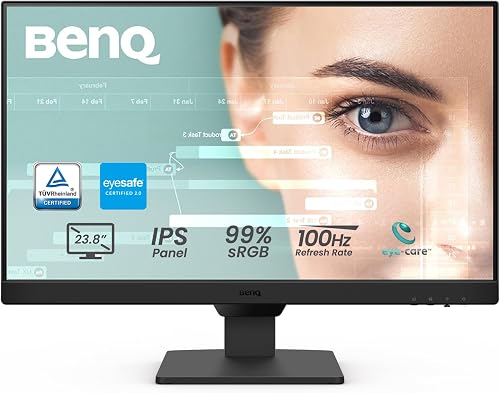 Best for color and eye comfort
BenQ GW2490 24" Computer Monitor 100Hz FHD

BenQ vs Dell monitors: the quick answer
The BenQ GW2490 wins overall for most readers, and the Dell SE2426H wins for motion-heavy work. Our score weighs specs, features and buyer feedback against what you're shopping for.
BenQ leads on color and eye care, while Dell leads on refresh rate and brightness.
The BenQ GW2490 scores 9.7, the highest here. It covers 99% sRGB and adds low blue light plus adaptive brightness.
For documents, spreadsheets, photos and long sessions, that combo is hard to beat.
The Dell SE2426H scores 8. It reaches 144Hz with a 1ms MPRT rating and FreeSync support.
That smooths scrolling and light gaming, but its 72% color gamut is the narrowest in this group.
If you want the full picture of Dell's own range before deciding, our Dell vs Samsung monitor comparison covers how Dell stacks up against another big office brand.
The two brands side by side
BenQ builds its office monitors around color and eye comfort, and Dell builds around motion and brightness. The table below puts the strongest BenQ pick next to the Dell SE2426H so the trade-offs are clear.
| Product | Best for | Screen size | Resolution | Refresh rate | Our score |
|---|---|---|---|---|---|
| BenQ GW2490 24" Computer Monitor 100Hz FHD | color and eye comfort | 24 in | 1920 x 1080 | 100Hz | 9.7 |
| BenQ GW2491 23.8” 1080p FHD 100Hz IPS | BenQ for tight desks | 23.8 in | 1920 x 1080 | 100Hz | 9.5 |
| Amazon Basics 27 Inch Monitor | one large screen | 27 in | 1920 x 1080 | 100Hz | 9.2 |
| Dell SE2426H | Dell for smooth motion | 23.8 in | 1920 x 1080 | 144Hz | 8.0 |
The BenQ GW2490 runs at 100Hz with a 250-nit brightness and a 1000:1 contrast ratio. The Dell SE2426H goes to 144Hz and 300 nits, and its IPS panel keeps colors consistent across a 178° viewing angle on both axes.
Both are 1080p IPS screens with FreeSync and thin bezels. The split comes down to what each brand chooses to spend on: BenQ on 99% sRGB and eye care features, Dell on speed.
Dell's brightness edge matters in a bright room. BenQ's color edge matters if your screen shows photos, design files or brand assets all day.
Color accuracy: BenQ's 99% sRGB against Dell's 72%
BenQ wins on color for work that needs accurate hues. The GW2490 and GW2491 both list 99% sRGB coverage, while the Dell SE2426H lists a 72% color gamut.
That gap is real for photo editing, design work and any job where a brand color must look right on screen. A 99% sRGB panel shows more of the color range most web content uses.
A 72% panel can leave reds and greens looking flatter.
The BenQ pair also adds color modes for different tasks. The GW2491 includes an ePaper Mode for long reading sessions, which shifts the look toward paper and away from a bright backlit glow.
Dell's IPS panel still keeps colors consistent as you move your head. The 178°/178° viewing angle means a colleague beside you sees roughly the same image.
It just shows a narrower slice of color overall.
If color accuracy is your main reason to upgrade, start with BenQ. If you mostly read text and browse, Dell's coverage is fine for daily use.
Eye comfort and brightness: who protects long sessions better?
BenQ goes further on eye care features, but Dell edges it on brightness. The BenQ GW2490 includes low blue light plus adaptive brightness and a flicker-free build.
The GW2491 adds TÜV certification and Eyesafe 2.0.
The Dell SE2426H answers with TÜV Rheinland 3-star eye comfort certification. That rating covers blue light reduction while keeping color quality intact.
Its 300 nits also beats BenQ's 250 nits, so it holds up better near a window.
If your desk faces a sunny window, the extra brightness on the Dell helps more than a color feature you won't notice. If you sit for eight hours of text work, BenQ's low blue light and adaptive brightness do more for comfort.
Neither brand replaces good habits. A monitor with low blue light still can't fix a desk set too close or too high.
Position the screen about an arm's length away and keep the top edge near eye level.
Refresh rate and motion: Dell's 144Hz lead
Dell wins the refresh rate race with 144Hz against BenQ's 100Hz. Both are well above the 60Hz of a basic office screen, so either feels smoother than an old monitor.
The Dell SE2426H pairs 144Hz with 1ms MPRT and FreeSync. That matters if you scroll long documents fast, edit video or play games after hours.
Motion stays clearer and screen tearing is reduced when a compatible graphics card drives it.
The BenQ GW2490 runs at 100Hz with FreeSync. That's smooth enough for everyday work and takes the edge off fast scrolling.
It just won't match the Dell when frames fly by.
The BenQ GW2491 also runs at 100Hz. It shares the same refresh rate as its bigger sibling but adds the ultra slim bezel and the ePaper Mode.
For pure office tasks, 100Hz is plenty. Choose Dell only if smooth motion is a real part of your day.
For most desk workers, the jump from 100Hz to 144Hz is smaller than the jump from color accuracy.
Ports and connectivity for a work desk
BenQ offers more ways to connect, while the Dell SE2426H keeps it simple with HDMI ports. The BenQ GW2490 has two HDMI ports and one DisplayPort, plus an input hotkey for switching between devices.
That hotkey matters if you share the screen between a work laptop and a home desktop. One press moves the picture without crawling under the desk.
The GW2490 also has built-in speakers, so a video call doesn't need separate audio gear.
The Dell SE2426H ships with an HDMI cable and has HDMI connectivity. It's enough for a laptop and a second device, but there's no DisplayPort and no speaker listed.
The BenQ GW2491 offers HDMI and DisplayPort, but it has fewer video inputs than the GW2490. It has no speakers listed, so budget for a headset or speakers.
If your desk has a docking station or a mix of laptops, the extra port and hotkey on the GW2490 save daily friction. A single HDMI setup like the Dell's works when one computer drives the screen.
Stand, mount and desk fit
The BenQ GW2490 and GW2491, the Amazon Basics 27 Inch Monitor and the Dell SE2426H are all VESA compatible, so a monitor arm evens out the stand differences. The Dell SE2426H has a tilt-only stand.
The BenQ GW2490 is thin-bezel and wall-mount ready.
The GW2491 goes further with an ultra slim bezel.
The Dell's tilt-only stand means no height or swivel adjustment out of the box. If you want the screen at eye level, a VESA arm or a riser fixes it.
The BenQ pair leans toward multi-screen setups thanks to the thin edges.
The BenQ GW2490 measures 6.9 inches deep, 16.03 inches wide and 21.26 inches high, and weighs 8.4 pounds. The Dell SE2426H is 7.04 inches deep, 21.21 inches wide and 16.23 inches high at 7.4 pounds.
The BenQ GW2491 is lighter at 2.7 kg.
For a narrow desk, the slimmer BenQ GW2491 bezel helps two screens sit closer together. For a single screen on an arm, the Dell's weight and VESA support make mounting straightforward.
If you're weighing Dell against another big maker for a home setup, our guide to whether Dell monitors are good for a home office walks through what to expect.
Price tier and value for the money
BenQ sits in the mid-range and Dell sits at the budget end of this group. BenQ spends on color coverage and eye care, while Dell spends on refresh rate.
Neither is the cheapest screen you can buy, but each targets a different buyer.
The BenQ GW2490 and GW2491 carry the 99% sRGB panel and the eye care stack. That's where the extra cost goes.
If you edit photos or stare at spreadsheets for hours, that spend earns its keep.
The Dell SE2426H trades color range for 144Hz and 300 nits. A gamer or a video editor who works with fast footage gets more from that trade.
A writer or a coder gets less.
The Amazon Basics 27 Inch Monitor sits in between on value. It gives you a larger 27-inch panel, four USB ports and speakers without paying for a brand name's color claims.
It lists 1080p on 27 inches, so text looks softer than on a 24-inch screen at the same resolution.
Value depends on the work. For color tasks, BenQ earns its price.
For motion and brightness, Dell does. If you're comparing more brands at this price level, our Acer vs Dell monitors comparison adds another option to the mix.
Who should buy which brand?
Buy BenQ if color accuracy or long-session comfort drives your work. Buy Dell if smooth motion and a bright panel matter more.
Here's the short version for each type of buyer.
Choose BenQ for color, reading and long sessions
The BenQ GW2490 suits designers, photographers and anyone who works with brand colors. Its 99% sRGB coverage keeps hues closer to true, and the low blue light plus adaptive brightness help during long days.
The BenQ GW2491 suits readers and small-desk setups. Its ePaper Mode and ultra slim bezel make long text easier and dual screens tidier.
It also fits a tighter desk at 23.8 inches.
Both BenQ models are the better fit for a two-screen desk. Thin bezels mean less gap between panels.
If you're planning a dual setup, our guide to dual-screen and two-monitor desks covers spacing and arm choices.
Choose Dell for speed and a brighter room
The Dell SE2426H suits buyers who scroll fast, edit video or game between work tasks. Its 144Hz refresh rate and 1ms MPRT keep motion clear, and FreeSync cuts tearing with a compatible card.
Its 300 nits also help in a room with strong daylight. If your desk sits near a window, the extra brightness matters more than a color range you won't use.
The Dell's tilt-only stand is the trade-off. Plan on an arm or riser if you want the screen at eye level.
Its 72% color gamut also rules it out for serious photo editing.
Consider a different brand for a big single screen
The Amazon Basics 27 Inch Monitor suits a buyer who wants one large display and fewer cables. Four USB ports and speakers cut down on desk clutter.
Just know that 1080p across 27 inches looks less sharp than a 24-inch screen.
If you're checking whether a different maker fits better, our review of whether ASUS is a good monitor brand for office work is worth a read before you buy.
Verdict: which brand should you buy?
The BenQ GW2490 is the best monitor for most desk workers in this BenQ vs Dell comparison. Its 99% sRGB panel and eye care features fit the daily reality of documents, photos and long hours better than a higher refresh rate does.
Choose the BenQ GW2491 instead if your desk is small or you read long text all day. Its ultra slim bezel and ePaper Mode make it the tidier BenQ for a compact setup.
Buy the Dell SE2426H if smooth scrolling and light gaming sit high on your list. Its 144Hz refresh rate, 1ms motion response and 300 nits brightness make it the faster, brighter screen.
The simple rule: pick BenQ when color and comfort decide your work, and pick Dell when speed does. Most buyers fall in the first group.
If you're still mapping your desk, start with our monitor brands and makers guide before you order.
Frequently asked questions
Is BenQ or Dell better for office work?
BenQ is the better fit for most office desks because its IPS panels cover 99% sRGB and add low blue light features. Dell is the stronger pick when smooth scrolling and a higher refresh rate matter more than color range.
How do the BenQ and Dell monitors differ in color coverage?
The BenQ models here put their budget into color coverage and eye care tech, while the Dell SE2426H puts its budget into a 144Hz refresh rate. Each brand spends on a different strength, so the better value depends on your daily work.
Can I use a BenQ and a Dell monitor together?
Yes, both use IPS panels at 1080p and connect over HDMI, so a two-screen desk works. Match the scaling in your operating system and keep the brighter Dell on the side where glare hits first.
Which brand is better for photo editing?
BenQ is the better choice for photo work because the GW2490 and GW2491 both cover 99% sRGB. The Dell SE2426H lists a 72% color gamut, which leaves less room for accurate color edits.
Do these monitors have built-in speakers?
The BenQ GW2490 and the Amazon Basics 27 Inch Monitor have built-in speakers. The BenQ GW2491 and the Dell SE2426H have no speakers listed, so plan on separate audio for those two.