ASUS ProArt PA279CRV vs ASUS ProArt PA279CV: Which Is Better? (November 2026)
The ASUS ProArt PA279CRV is the better buy for most people, because its 99% DCI-P3 and 99% Adobe RGB coverage and 96-watt USB-C power delivery beat the PA279CV. Pick the PA279CV only if you want a proven 4K workhorse and its 65-watt USB-C is enough for your laptop.
On this page (7 sections)
- ASUS ProArt PA279CRV vs PA279CV: the two side by side
- Color gamut: which panel covers the work you do?
- USB-C power: can one cable run your laptop?
- Ergonomics and stand: do both adjust enough?
- Build quality, warranty and what comes in the box
- Who should buy which?
- The verdict: ASUS ProArt PA279CRV vs ASUS ProArt PA279CV
The ASUS ProArt PA279CRV is the better buy for most people, because its 99% DCI-P3 and 99% Adobe RGB coverage and 96-watt USB-C power delivery beat the PA279CV. The PA279CV remains a solid 4K panel, but it covers the smaller sRGB and Rec.
709 color spaces and tops out at 65 watts of USB-C power.
Both are 27-inch 4K IPS monitors aimed at creators, and both are Calman Verified with factory calibration to Delta E < 2. The ASUS ProArt PA279CRV vs ASUS ProArt PA279CV choice really comes down to color range, laptop charging and whether you need daisy-chaining.
This comparison sticks to the specs and features each monitor lists. It maps each difference to the work you actually do, rather than to impressions.

ASUS ProArt PA279CRV vs PA279CV: the two side by side
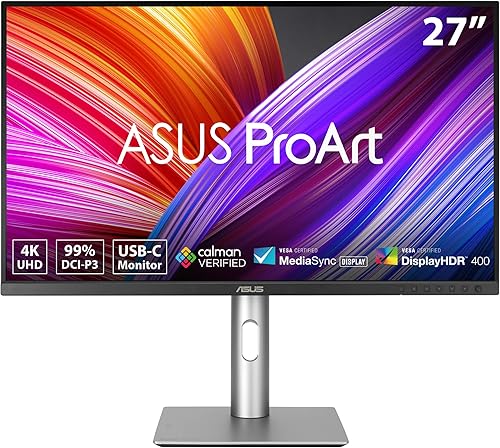
The PA279CRV wins on color coverage, USB-C power and daisy-chaining; the PA279CV wins on price tier and a more modest power draw. Here is how the headline numbers line up.
| Product | Best for | Resolution | Panel | USB-C power | Our score |
|---|---|---|---|---|---|
| ASUS ProArt PA279CRV 27 Inch 4K UHD | color-critical work | 3840 x 2160 | IPS, 178 degrees | 96W | 9.7 |
| ASUS ProArt PA279CV | general 4K office work | 3840 x 2160 | IPS, 178 degrees | 65W | 7.9 |
| Feature | ASUS ProArt PA279CRV | ASUS ProArt PA279CV |
|---|---|---|
| Screen | 27-inch 4K UHD (3840 x 2160), IPS | 27-inch 4K UHD (3840 x 2160), IPS |
| Color gamut | 99% DCI-P3, 99% Adobe RGB | 100% sRGB, 100% Rec. 709 |
| Color accuracy | Calman Verified, Delta E < 2 | Calman Verified, Delta E < 2 |
| USB-C power delivery | 96W | 65W |
| Daisy-chain | DisplayPort daisy-chain | Not named in the specs |
| Adaptive sync | FreeSync | FreeSync |
| Warranty | 5 years with registration | 5 years with registration |
| Price tier | Higher | Lower |
Both panels are 16:9 with a 178-degree viewing angle and a 3840 x 2160 resolution. At this size, 4K works out to about 163 pixels per inch, which keeps text crisp without scaling tricks.
Where the two monitors are genuinely the same
The core panel story is close: same size, same resolution, same IPS viewing angle, same Calman Verified Delta E < 2 target. If you only need sharp 4K text for documents, either monitor delivers.
Both also carry FreeSync, so a compatible graphics card can smooth motion. Both include a 5-year warranty when you register online, and both ship with an Adobe Creative Cloud offer that runs to 8/31/2028.
Neither is a gaming-first design. The refresh rate and response time aren't part of the headline specs here, so don't buy either one expecting a high-refresh gaming panel.
Where they part ways
The PA279CRV adds wide-gamut coverage, 96W USB-C and DisplayPort daisy-chaining. The PA279CV keeps to sRGB and Rec.
709, offers 65W USB-C and lists a USB 3.1 hub.
Those three extras are the real fork in the road. Each one matters to a different kind of buyer, so the rest of this comparison takes them one at a time.
Color gamut: which panel covers the work you do?
The PA279CRV covers wider color spaces, so it suits photo, video and print prep; the PA279CV covers the sRGB and Rec. 709 spaces that most office and web work uses.
Pick by the color spaces your files live in.
The PA279CRV lists 99% DCI-P3 and 99% Adobe RGB coverage. DCI-P3 is the gamut used for HDR video and much of modern digital cinema, while Adobe RGB reaches into the greens and cyans that print work often needs.
The PA279CV lists 100% sRGB and 100% Rec. 709 coverage.
Those two spaces define ordinary web content and broadcast video, and 100% of each means no clipping inside those boundaries.
When wide gamut matters
Choose the PA279CRV if you grade video, retouch raw photos or prepare files for print. Wide-gamut panels let you see saturated colors that an sRGB screen would compress.
The monitor also carries HDR support and a 400 cd/m2 brightness figure. That's a modest HDR experience compared with a dedicated HDR display, but it's useful in a room where you control the light.
If your work never leaves sRGB, the extra gamut won't change your output. In that case, the PA279CV's 100% sRGB coverage is the right target and you save on the price tier.
When sRGB is enough
The PA279CV suits spreadsheets, documents, web browsing, coding and light photo edits. Its 100% sRGB coverage means colors in ordinary web images land where they should.
For a general home office, this is the sensible spec. Most office suites and browsers assume sRGB, so a wider gamut adds headroom you may never use.
If you're weighing brands more broadly before you commit, our guide on whether ASUS is a good monitor brand for office work covers where the ProArt line sits against the rest of ASUS's range.
USB-C power: can one cable run your laptop?
The PA279CRV delivers up to 96 watts over USB-C, enough for most 14-inch and 16-inch laptops; the PA279CV delivers up to 65 watts, which covers many ultrabooks but not every larger machine. Check your laptop's adapter wattage first.
A single-cable desk is the main reason people buy a USB-C monitor. The monitor carries video, data and power down one cable, so your laptop stays charged while the screen runs.
The PA279CRV's 96W Power Delivery sits at the top of what a laptop-class USB-C link usually supplies. Many 14-inch laptops ship with a 65W to 96W adapter, so this monitor can replace the charger in those cases.
The PA279CV's 65W Power Delivery covers lighter laptops and many ultrabooks. A larger laptop with a 96W or higher adapter will charge more slowly or hold its level rather than fill up quickly.
Check your laptop's adapter before you choose
Look at the wattage printed on your laptop's charger. If it says 65W or less, either monitor can keep it topped up.
If it says 96W or more, the PA279CRV is the safer match.
Charging speed also depends on the laptop's own power limits. A laptop that caps USB-C input below the monitor's output won't use the full 96W, but the higher ceiling still helps as laptops get hungrier.
The hub and daisy-chain extras
The PA279CRV includes a USB hub and DisplayPort daisy-chain support. Daisy-chaining lets you run a second monitor from the first through one cable, which keeps a two-screen desk tidy.
The PA279CV lists a USB 3.1 hub for peripherals. It doesn't name daisy-chain support in its connections, so plan on separate cables if you want two screens.
If a multi-monitor desk is your goal, read our guide to running two screens from one laptop before you buy, since the cabling rules differ between daisy-chain and hub setups.
Ergonomics and stand: do both adjust enough?
Both stands adjust for tilt, swivel, pivot and height, so the difference is small and your desk and seating matter more. Neither monitor locks you into a fixed viewing angle.
The PA279CRV lists tilt, swivel, pivot and height adjustment in its features. The PA279CV also lists height, pivot, swivel and tilt adjustment.
On paper, the ergonomic range is close.
That matters for long sessions. You can raise either screen to eye level and turn it portrait for long documents.
Both are also wall-mountable if you'd rather use an arm.
Panel brightness and glare
The PA279CRV lists 400 cd/m2 brightness. That's bright enough for a typical office or studio, though a room with strong windows may still call for shading.
The PA279CV's brightness figure in its specs reads as an outlier that doesn't match a typical 4K IPS panel, so treat the PA279CRV's 400 cd/m2 as the figure to plan around. If you work beside a bright window, position either screen to avoid direct glare.
Desk space and cables
Both are 27-inch monitors with a similar footprint class. Plan for the stand depth plus room to tilt the screen, and keep the USB-C cable short enough to reach your laptop without strain.
A single-cable setup reduces clutter, which is where the PA279CRV's 96W link helps most. The PA279CV still needs just one cable for video and power if your laptop fits within 65W.
Build quality, warranty and what comes in the box
Both carry a 5-year warranty with online registration and both include a calibration report and cables. The warranty terms are the same, so build confidence doesn't separate them.
ASUS backs both monitors with 3 years plus a 2-year extension when you register online. That's a long coverage window for a work monitor you plan to keep for years.
Each box includes a calibration report, a quick start guide and the main cables. The PA279CRV adds a USB-C cable and DisplayPort cable alongside the HDMI cable.
The PA279CV includes a DisplayPort cable, an HDMI cable and a USB-C cable.
The Adobe Creative Cloud offer
Both monitors include a free 3-month Adobe Creative Cloud subscription, valid through 8/31/2028. For a photographer or designer, that's a useful bridge while you settle into the new screen.
The offer doesn't change which monitor is better. It just softens the first months of ownership on either one.
Which has the cleaner port setup
The PA279CRV lists DisplayPort over USB-C, DisplayPort, HDMI and a USB hub. The PA279CV lists USB-C, DisplayPort, HDMI and four USB 3.2 Gen 1 Type-A ports.
The PA279CV's four downstream USB-A ports are handy if you plug in a keyboard, mouse and card reader. The PA279CRV's hub serves the same purpose while adding daisy-chain potential.
If you're also comparing ASUS against other makers, our ASUS vs Dell monitor guide weighs the two brands on panel quality and port choices. And if you want a sense of where Dell stands on its own, our look at whether Dell monitors are good for a home office is a useful cross-check.
Who should buy which?
Buy the PA279CRV for color-critical work and a one-cable laptop desk; buy the PA279CV for everyday 4K office work where sRGB is all you need. The decision follows your files and your laptop, not the badge on the bezel.
Buy the ASUS ProArt PA279CRV if:
- You edit photos or video and need DCI-P3 or Adobe RGB coverage.
- Your laptop's charger is 96W or close, and you want one cable for power and video.
- You plan a two-screen desk and want DisplayPort daisy-chaining.
- You work in a room where you control the light and want the brighter 400 cd/m2 panel.
Buy the ASUS ProArt PA279CV if:
- Your work stays inside sRGB and Rec. 709, such as documents, web and light editing.
- Your laptop draws 65W or less, so its USB-C power is plenty.
- You want a 4K workhorse at a lower price tier and don't need wide-gamut coverage.
- You'd rather have four downstream USB-A ports than a daisy-chain.
If neither ASUS model fits your budget or port needs, it's worth reading whether LG monitors are good for work to see how the alternatives compare. LG's USB-C models often target the same single-cable desk.
The verdict: ASUS ProArt PA279CRV vs ASUS ProArt PA279CV
The ASUS ProArt PA279CRV wins this comparison for most readers, and the PA279CV is the right choice only when sRGB coverage and 65W charging match your setup. The extra gamut, the 96W USB-C link and the daisy-chain support are the reasons.
Here's the short version of the ASUS ProArt PA279CRV vs ASUS ProArt PA279CV call. If you edit color for a living or run a laptop-and-monitor desk from one cable, the PA279CRV earns its higher tier.
The PA279CV still makes sense for a straightforward 4K office screen. It's Calman Verified, covers sRGB fully and offers 65W USB-C, which is enough for many laptops.
Just don't buy it expecting wide-gamut editing headroom.
One last check before you order: look at your laptop's charger wattage and the color space your main files use. Those two facts settle the choice faster than any spec table.
Frequently asked questions
Is the PA279CRV worth the extra cost over the PA279CV?
Yes for color work. The PA279CRV covers 99% DCI-P3 and 99% Adobe RGB, while the PA279CV covers 100% sRGB and 100% Rec.
If you edit photos or video, that wider gamut and the extra USB-C power justify the step up.
Can either monitor charge a MacBook through USB-C?
Both can. The PA279CRV delivers up to 96 watts over USB-C and the PA279CV delivers up to 65 watts.
A 14-inch MacBook Pro ships with a 67W or 96W adapter depending on the model, so the PA279CRV covers more laptops at full speed.
Do these monitors have built-in speakers?
The PA279CRV lists built-in speakers among its features. The PA279CV's features list a USB hub, adaptive sync and blue light filtering, but speakers are not named in its specifications.
What does Calman Verified mean on these monitors?
ASUS says each panel leaves the factory pre-calibrated to Delta E < 2, and Calman Verified means the calibration was checked against that target. In plain terms, the color should be close to accurate out of the box without a separate calibrator.
Can I daisy-chain two of these monitors?
The PA279CRV supports DisplayPort daisy-chaining, so you can run a second screen from one cable. The PA279CV's listed connections are DisplayPort, HDMI and USB-C, without daisy-chain support named in its specs.
Which stand adjusts more?
The PA279CRV lists tilt, swivel, pivot and height adjustment. The PA279CV's features also include height, pivot, swivel and tilt adjustment.
Both stands are adjustable, so ergonomics come down to your desk height and seating rather than a clear winner.