Are Dell Monitors Good for a Home Office?
Dell monitors can be good for a home office if you choose a model with the screen size, resolution, connections, and stand adjustments your work needs. Dell offers options from compact 24-inch Full HD displays to 27-inch 4K and wide curved screens.
On this page (6 sections)
Dell monitors can be good for a home office if you match the model to your screen size, resolution, connections, and stand needs. The brand has compact Full HD screens, 27-inch QHD and 4K options, and a wide curved model with USB-C.
The right choice depends on your work. A sharper screen may help with small text and dense spreadsheets, while an adjustable stand can make it easier to set the display at a comfortable height.
Are Dell monitors good for home office work?
Yes, Dell monitors can work well for home office tasks when the features match your setup. The examples here include built-in speakers, adjustable stands, and resolutions from Full HD to 4K.
For general documents, email, and video calls, a 24-inch Full HD screen may be enough. If you often keep several windows open or work with detailed spreadsheets, consider a 27-inch QHD or 4K model.
Compare the stand, ports, and screen resolution before focusing on brand. A monitor that fits your desk and computer is more useful than one with features you won't use.
For a broader starting point, see our guide to the best computer monitor for a home office. It can help you narrow down the screen size and feature mix before you pick a brand.
What should you check before choosing a Dell monitor?
Start with screen size, resolution, computer connections, and stand movement. Those details affect how much you can see, how sharp text looks, and whether the display fits your work area.
A 23.8-inch Full HD screen keeps the footprint smaller. A 27-inch QHD screen gives you more pixels, while a 27-inch 4K model offers finer detail; you may need display scaling to make text comfortable to read.
Check your computer's available video ports. HDMI and DisplayPort suit many desktop setups, while USB-C may help reduce cables when a monitor supports laptop power delivery.
Stand adjustments matter if you need to change screen height or angle during the day. Some Dell models here support height, tilt, pivot, and swivel adjustments, but the S3425DW supports height and tilt.
If you are weighing screen density, our guides to 1080p on a 27-inch monitor and 1440p versus 1080p for office work explain the tradeoffs.
Which Dell monitor size suits a home office?
Choose a compact 24-inch display for a smaller desk, a 27-inch screen for a flexible single-monitor setup, or an ultrawide when you want more horizontal workspace. Measure the available width and viewing distance before deciding.
The Dell S2425HSM is a 23.8-inch Full HD monitor with HDMI connectivity and built-in speakers. Its stand supports height, tilt, pivot, and swivel adjustments.
The Dell S2725DSM is a 27-inch QHD screen with HDMI and DisplayPort. Its stand adjusts for height, tilt, pivot, and swivel, which gives you more ways to position it.
A 34-inch ultrawide takes more desk width, but its 21:9 format can give you room for side-by-side windows. The Dell S3425DW also has USB-C with up to 65W power delivery, which may suit a compatible laptop setup.
Compare 27-inch and 32-inch monitors for office work if you're unsure how much screen space your desk can handle.
Is QHD or 4K better on a Dell monitor?
QHD is a practical middle ground for many 27-inch work screens, while 4K provides finer detail. The choice depends on how much screen space you want and whether you prefer to scale text larger.
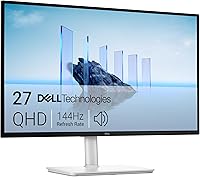
The Dell S2725DSM has a 27-inch QHD resolution of 2560 x 1440. It includes a 144Hz refresh rate, built-in dual 3W speakers, and an adjustable stand.
The Dell S2725QS is a 27-inch 4K display with a 3840 x 2160 resolution. It supports height, tilt, pivot, and swivel adjustments, and includes HDMI and DisplayPort connections.
At 27 inches, 4K can make small interface text look very fine at default scaling. Adjust the operating system's display scaling if text or icons feel too small.
For a closer comparison, read 4K versus 1440p for work. If you use your screen mainly for spreadsheets, our guide to monitors for spreadsheets and Excel covers screen layout needs.
Do Dell monitors have useful home office features?
Some Dell monitors combine adjustable stands, speakers, and eye-comfort features, so check each model rather than assuming every screen has the same options. The four monitors here vary in resolution, ports, and stand movement.
The S2725DSM and S2425HSM include dual 3W speakers and have a 4-star TÜV eye-comfort certification. Both offer height, tilt, pivot, and swivel adjustment.
The S2725QS has a 4-star certification and improved ComfortView Plus, which Dell says reduces harmful blue light emissions to 35% or less. It also has built-in speakers and an adjustable stand.
The S3425DW has ComfortView Plus and built-in speakers, plus USB-C with up to 65W power delivery. Its stand offers height and tilt adjustment.
Built-in speakers can reduce desk clutter for calls and basic audio, but check whether their sound suits your needs. If speakers are a priority, compare options in our guide to monitors with built-in speakers.
Which Dell monitor is a fit for your setup?
Pick the Dell S2425HSM for a compact Full HD setup, the S2725DSM for 27-inch QHD, the S2725QS for 27-inch 4K, or the S3425DW for an ultrawide desk. Check your desk dimensions and computer ports before choosing.
Choose the S2425HSM if you want a smaller display with an adjustable stand and HDMI connection. Consider the S2725DSM if you want a 27-inch QHD screen with HDMI and DisplayPort.
The S2725QS suits readers who want 4K detail on a 27-inch screen. The S3425DW is the wide-screen option, with USB-C power delivery for a compatible laptop.
Dell monitors can be a good home office choice, but the right model depends on the screen and connections your work calls for. To compare another major brand, see Dell versus Samsung monitors for work.
Frequently asked questions
Are Dell monitors good for office work?
Yes, Dell monitors can suit office work when the resolution, screen size, connections, and stand fit your setup. For example, a 27-inch QHD screen gives you more detail than Full HD, while a 27-inch 4K screen offers finer detail.
Check the computer's video outputs and your desk space before choosing.
Is a 27-inch Dell monitor good for work?
A 27-inch Dell monitor can be a useful middle ground for office work. QHD gives you more workspace detail than Full HD, while 4K makes text and fine details sharper.
Your preferred scaling and viewing distance matter, so consider how much desk space you have and whether you prefer larger on-screen text.
Do Dell monitors work with a MacBook?
Many Dell monitors connect through HDMI, DisplayPort, or USB-C, but the right option depends on the monitor and MacBook. Check which video outputs your Mac supports and whether you need charging through the same cable.
A USB-C connection alone doesn't guarantee that a monitor can power a laptop.
Are Dell monitors good for spreadsheets?
A Dell monitor with a larger screen or higher resolution can make it easier to view more spreadsheet columns at once. A 27-inch QHD or 4K display may suit a single-screen setup, while an ultrawide can place more columns side by side.
Check your desk width and computer connection first.