LG vs HP Monitor: Which Is Better for Office Work? (November 2026)
The HP 24mh wins for most office desks because it pairs IPS color with height and tilt adjustment and three video ports. Pick the LG 27U411A-B instead if you want a larger 27-inch screen with a 120Hz refresh rate.
On this page (8 sections)
- LG vs HP monitor: which screen fits your desk?
- Which stand and adjustment suits a long work day?
- Which screen size fits an office desk?
- Which offers better ports and connectivity for a work setup?
- Does refresh rate matter for office work?
- How do the other HP and LG office screens change the choice?
- Who should buy which?
- Verdict: which brand should you choose for office work?
The HP 24mh wins for most office desks because it pairs IPS color with height and tilt adjustment and three video ports. In this LG vs HP monitor comparison, the HP screen covers the everyday needs of a full-time desk, while the LG 27U411A-B is the pick when a bigger 27-inch panel and a 120Hz refresh rate matter more.
Both brands build solid IPS office screens. The split comes down to ergonomics, port choice, screen size and refresh rate rather than picture quality in general.
This comparison weighs the HP 24mh against the LG 27U411A-B as the main head-to-head. The HP Series 3 27 inch and the LG 32MR50C-B Curved appear where they change the decision.


LG vs HP monitor: which screen fits your desk?
The HP 24mh is the better all-round office monitor, and the LG 27U411A-B is the better large-screen pick for speed. The choice turns on how much adjustment you need, which computers you connect and whether a faster panel is worth losing port variety.
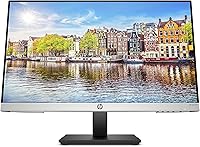
The HP 24mh carries our top score of 9.7. Its 23.8-inch IPS panel runs at 1920 x 1080 and 75Hz, and the stand adjusts 100mm in height with 5° forward and 23° backward tilt.
It also has HDMI, DisplayPort and VGA plus two built-in 2W speakers.
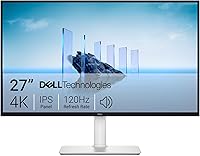
The LG 27U411A-B scores 9.6. It steps up to a 27-inch IPS panel at 120Hz with HDR10 and up to 99% sRGB coverage.
Its tilt stand moves from -5° to 20°, and HDMI is the only video input.
That single point, HDMI only against three ports on the HP, is the clearest practical gap. A desk with a laptop and a desktop needs the extra inputs the HP offers.
A single-cable setup leans toward the LG for its smoother panel.
| Feature | HP 24mh FHD Monitor | LG 27U411A-B 27-inch Full HD |
|---|---|---|
| Screen size | 23.8 in | 27 in |
| Panel | IPS, 1920 x 1080 | IPS, 1920 x 1080 |
| Refresh rate | 75Hz | 120Hz |
| Color extras | Low Blue Light mode | HDR10, up to 99% sRGB |
| Video ports | HDMI, DisplayPort, VGA | HDMI |
| Ergonomics | 100mm height, tilt | Tilt -5° to 20° |
| Speakers | Two 2W built-in | None |
| Score | 9.7 | 9.6 |
Which stand and adjustment suits a long work day?
The HP 24mh gives you more ways to set the screen at a comfortable height, while both LG and HP models here tilt but do not all offer height travel. For most people who sit at a desk for hours, the HP 24mh's height adjustment is the feature that decides the buy.
The HP 24mh lets you raise or lower the panel by 100mm and tilt it 5° forward or 23° back. That range lets a shorter or taller user line the top of the screen near eye level without stacking books under the base.
The HP Series 3 27 inch offers 4-way adjustability, guided by an Ergonomic Setup Guide in the HP Display Center. That is more control than the LG models, though the HP Series 3 lacks the 24mh's stated height range in its listed specs.
The LG 27U411A-B and LG 32MR50C-B are tilt only. Their stands move from -5° to 20° and adjust for viewing angle but not height.
On a fixed-height desk that usually means adding a riser or arm.
If you use a monitor arm already, ergonomics matter less. All four panels are VESA compatible in name, though the LG 27U411A-B and HP Series 3 list wall mounting as their mounting type.
For a plain desk with no arm, the HP 24mh is the safest pick. Its stand does the height work for you, which is why it takes the top spot for office use.
Which screen size fits an office desk?
A 24-inch screen suits a typical desk close to your chair, while a 27-inch or 32-inch screen needs more viewing distance to stay comfortable. The LG 27U411A-B and LG 32MR50C-B Curved give you more space, but only if your desk is deep enough to sit back from them.
The HP 24mh measures 23.54 x 8.33 x 18.28 inches in width, depth and height. Its 23.8-inch IPS panel keeps 1080p pixels dense, so small text stays crisp at normal reading distance.
The LG 27U411A-B spreads 1080p across 27 inches. You gain room for two documents or a wide spreadsheet, but the pixels sit farther apart, which softens fine text.
The LG 32MR50C-B goes further, with a 31.5-inch curved VA panel at the same 1080p resolution.
That curve wraps the screen around your view. On a big desk it can suit wide documents and video, though a VA panel shifts color more as you move off-center than the IPS screens on the HP models.
A 27-inch HP option also exists. The HP Series 3 27 inch pairs the bigger screen with a 1300:1 contrast ratio and a 100Hz refresh rate, giving more room without the curve.
Its tilt-only stand is the trade-off against the 24mh's height adjustment.
If your desk is 24 inches deep or less, stay near 24 inches. If you can sit about 30 inches back, a 27-inch screen works well and the 32-inch curve needs the most space of all.
Which offers better ports and connectivity for a work setup?
HP wins on connections in this matchup, because the HP 24mh and HP Series 3 each offer HDMI, DisplayPort and VGA while the LG 27U411A-B has HDMI only. If you swap between a work laptop and a home desktop, that difference saves you from unplugging cables every day.
The HP 24mh includes an HDMI cable and an audio cable in the box alongside its three video inputs. A laptop on HDMI and a desktop on DisplayPort can both stay connected, and you switch at the monitor.
The HP Series 3 27 inch matches that trio with VGA, HDMI 1.4 and DisplayPort 1.2. It ships with an HDMI cable and an AC power cable, so a single-cable setup is ready out of the box.
The LG 27U411A-B lists HDMI as its only hardware connectivity. Its included components are an HDMI cable, the monitor and a power cable.
One cable is all you get, which suits a single laptop but not a two-computer desk without a switch or dock.
The LG 32MR50C-B Curved adds D-Sub alongside HDMI. That legacy input helps an older office PC, though most modern laptops will use HDMI.
Count your devices before you choose. Two computers, a console or a shared desk with a docking station favors the HP port set.
A single laptop and a clean cable run favors the LG.
Does refresh rate matter for office work?
A 120Hz panel makes scrolling and window movement smoother, but 75Hz is fine for documents and spreadsheets. The LG 27U411A-B leads on speed in this comparison, while the HP models keep the frame rate modest and the port choice wider.
The LG 27U411A-B runs at 120Hz and adds HDR10 plus up to 99% sRGB coverage. Its FreeSync and G-Sync Compatible support matters for after-hours gaming more than for email.
Reader Mode lowers blue light for long reading sessions.
The HP 24mh runs at 75Hz with a 250 cd/m² brightness and a Low Blue Light mode. Its FreeSync support is listed, and the panel's IPS technology holds color across 178° horizontal and vertical angles.
That is more than enough for spreadsheets, calls and document review.
The HP Series 3 27 inch sits between the two with a 100Hz refresh rate. Its 1300:1 contrast ratio and HP Eye Ease with Eyesafe certification target comfort during long sessions.
Those are office-friendly traits that the raw refresh number doesn't capture.
Smoother motion helps when you scroll long pages or drag windows across a big screen. For typing and reading, the gap between 75Hz and 120Hz is subtle.
Choose the LG for speed and color work, the HP for comfort features and ports.
If you care about color accuracy for design or photo work, read more about whether LG monitors are good for work before you commit to the faster panel. Its sRGB coverage is the main draw for creative tasks.
How do the other HP and LG office screens change the choice?
The HP Series 3 27 inch is the pick when you want a larger HP screen without giving up contrast and comfort features, and the LG 32MR50C-B Curved is the pick for an immersive big screen. Both are worth a look if the head-to-head models feel like the wrong size.
The HP Series 3 27 inch has a 27-inch IPS panel at 1920 x 1080, a 1300:1 contrast ratio and a 100Hz refresh rate. HP adds HP Eye Ease with Eyesafe certification, dual 2W speakers and 4-way adjustability.
Its build uses at least 90% post consumer recycled plastics in the enclosure and 20% recycled glass in the panel, and HP backs it with a 3-year limited warranty.
The LG 32MR50C-B Curved pairs a 31.5-inch curved VA panel with a 3000:1 contrast ratio and a 100Hz refresh rate. Its OnScreen Control lets you split the workspace or adjust settings with a few mouse clicks.
AMD FreeSync, Black Stabilizer and Reader Mode round out the feature set. The ergonomic stand is tilt only.
Neither is the best overall office pick here. The HP 24mh still wins on balance.
The HP Series 3 27 inch is the best HP for extra screen room, and the LG 32MR50C-B Curved is the best for an immersive big screen.
If brand fit matters more than these specific models, our comparison of ASUS as a monitor brand and the Dell vs Samsung monitor matchup show how the other makers handle office desks. For a closer LG-only look, the BenQ vs LG monitor comparison covers how LG stacks up when the office buyer wants a second opinion.
When the 27-inch LG makes more sense
The LG 27U411A-B is the better fit for a single-laptop desk where a smooth 120Hz screen and strong color matter. Its 99% sRGB coverage and HDR10 give video calls and creative work a richer picture, and its near-borderless design cleans up a dual setup.
When the curved 32-inch LG is worth it
The LG 32MR50C-B Curved earns its place on a deep desk where wide documents and video fill the view. Its 3000:1 contrast ratio deepens dark scenes, and the curve wraps the screen around your seat.
It ranks last here because 1080p across 32 inches is the softest picture and its VA panel shifts color more at wide angles.
Who should buy which?
Most office buyers should take the HP 24mh, while the LG 27U411A-B suits a single-laptop desk that wants a bigger, faster screen. The HP Series 3 27 inch and LG 32MR50C-B Curved are the right calls only when their size and shape match your room.
Pick the HP 24mh if you sit at a desk for full work days, connect more than one computer and want a stand that adjusts in height. Its three ports and 100mm height travel handle the practical side of an office setup.
Pick the LG 27U411A-B if a 27-inch screen fits your desk depth and you want the smoothest scrolling and strongest color in this group. Its 120Hz panel and up to 99% sRGB coverage suit buyers who also do light creative work.
Pick the HP Series 3 27 inch if you want HP's comfort features and a 27-inch screen without the curve. Its 1300:1 contrast ratio and HP Eye Ease certification help long sessions, and its 3-year limited warranty adds peace of mind.
Pick the LG 32MR50C-B Curved if you have the desk space for an immersive big screen and watch a lot of video. Its 3000:1 contrast ratio and OnScreen Control suit wide documents and split-screen multitasking.
Skip the larger LG models if your desk is shallow. A 27-inch or 32-inch screen too close to your seat makes you move your head to read the edges.
Verdict: which brand should you choose for office work?
For office work, HP is the better choice for most buyers, and the HP 24mh is the screen to buy. The LG vs HP monitor decision leans to HP because height adjustment and three video ports matter more day to day than a faster refresh rate.
The HP 24mh takes our top score at 9.7. It pairs IPS color with a stand that adjusts in height, two built-in speakers and HDMI, DisplayPort and VGA.
That covers the real needs of a full-time desk.
The LG 27U411A-B is the best pick when you want a 27-inch screen and a 120Hz refresh rate. Its HDR10 and 99% sRGB coverage make it the stronger choice for color-aware work.
Its HDMI-only input is the reason it doesn't win overall.
If you want more screen room from HP, the HP Series 3 27 inch is the best HP for extra screen room. If you want the big curve, the LG 32MR50C-B Curved is the best for an immersive big screen.
Start with your desk depth. If you can sit about 30 inches back, the 27-inch LG 27U411A-B is a fair call.
If not, the 24mh's height-adjustable stand and extra ports make it the safer office buy.
Frequently asked questions
Is LG or HP better for a dual-monitor office setup?
Both brands sell near-borderless screens that pair well. The HP 24mh has micro-edge bezels on three sides, while the LG 27U411A-B uses ultra-slim borders and a sleek stand, so either brand gives you a clean two-screen desk.
Do these office monitors have built-in speakers?
The two HP models do. The HP 24mh and HP Series 3 both include dual 2W built-in speakers, while the LG 27U411A-B and LG 32MR50C-B do not, so you would need separate speakers for calls or video.
Which has better ergonomics, LG or HP?
The HP 24mh offers more adjustment than the other picks, with 100mm of height travel and tilt. The HP Series 3 has 4-way adjustability with an Ergonomic Setup Guide, and both LG monitors here are tilt only.
Can I connect a laptop and a desktop to one office monitor?
Yes, if the monitor has enough inputs. The HP 24mh and HP Series 3 each offer HDMI, DisplayPort and VGA, so you can wire two computers and switch between them without swapping cables.
Is a curved monitor good for office work?
A curved screen can suit wide spreadsheets and long documents on a big desk. The LG 32MR50C-B pairs its curve with a 3000:1 contrast ratio, though its VA panel shifts color more at wide angles than the IPS screens here.