Dell vs Samsung Monitors for Work: Which Is Better? (October 2026)
Choose the Dell S2725QS for a faster refresh rate and more stand adjustments, or the Samsung ViewFinity S7 for a straightforward 4K work display. This Dell vs Samsung monitor comparison also includes a Dell QHD option if you prefer less screen detail and a higher refresh rate.
On this page (6 sections)
Choose the Dell S2725QS for a 27-inch 4K monitor with a refresh rate up to 120Hz and four stand adjustments, or the Samsung ViewFinity S7 for 4K at 60Hz with Eye Saver Mode. In this Dell vs Samsung monitor comparison, the best fit depends on how much detail, motion and positioning control your work needs.
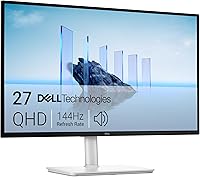
There are 2 different decisions here: Dell against Samsung for 4K, and whether QHD is enough for your desk. The Dell S2725DSM adds that second choice, with a 144Hz refresh rate and a lower resolution.

Dell vs Samsung monitor: which is better for work?
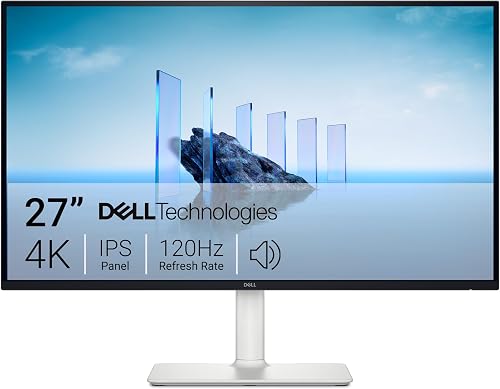
The Dell S2725QS offers more listed stand adjustments and a higher refresh rate; the Samsung ViewFinity S7 keeps to 4K at 60Hz. Both are 27-inch 4K UHD IPS monitors with HDMI and DisplayPort.
The Dell reaches up to 120Hz and includes height, pivot, swivel and tilt adjustments. Samsung's ViewFinity S7 is rated at 60Hz and includes Eye Saver Mode and flicker prevention.
Those differences may matter more than the brand name. If you move your screen to share work or adjust its height during the day, the Dell's stand features are useful; if you're comparing fixed 4K desk displays, the Samsung covers the same resolution and panel type.
For a broader look at Dell's work monitors, read our guide to Dell monitors for a home office. It can help you weigh this specific comparison against other Dell options.
Is 4K or QHD better for office work?
Choose 4K for finer detail and more workspace; choose QHD if 2560 x 1440 fits your tasks and computer better. The Dell S2725QS and Samsung ViewFinity S7 are 4K, while the Dell S2725DSM is QHD.
At 27 inches, 4K packs more pixels into the screen than QHD. That can make small text and detailed images look sharper, though some people prefer scaling so menus and text appear larger.
QHD still gives you room to arrange documents, spreadsheets and browser windows. It asks less of your computer's graphics hardware than 4K in many setups, but check your computer's supported output and the monitor's connection before buying.
If you are deciding between the two resolutions, see whether 1440p is worth it over 1080p for office work. For another direct resolution comparison, our 4K vs 1440p monitor guide explains the tradeoffs by screen size and use.
How does Dell vs Samsung monitor sharpness compare?
The 2 4K models have the same 3840 x 2160 resolution on a 27-inch IPS display. Their resolution alone doesn't tell you which one will suit your desk better; consider text scaling, screen position and the apps you use.
The QHD Dell has 2560 x 1440 resolution on a 27-inch display. If you use fine text all day and want sharper edges, 4K has the advantage on paper; if you need larger text or prefer less detail, QHD may be more comfortable at your chosen scaling.
Which Dell and Samsung features matter most for a work desk?
Match the monitor's adjustments, ports and comfort features to your desk and computer. These models all have HDMI and DisplayPort, while the Dell stands list more adjustment options.
The Dell S2725QS and S2725DSM list height, pivot, swivel and tilt adjustment. That gives you more ways to position the screen, though the right posture still depends on your chair, desk height and viewing distance.
The Samsung ViewFinity S7 includes an HDMI cable, a DisplayPort cable and a power cable. The Dell S2725QS includes an HDMI cable, and the S2725DSM includes an HDMI cable; check whether you already have the right cable for your computer.
Each monitor has eye comfort features, but the details differ. Dell says the S2725QS reduces harmful blue light emissions to 35% or less while maintaining color accuracy; the S2725DSM is described as TÜV 4-star certified for eye comfort.
Samsung's Eye Saver Mode minimizes blue light and prevents screen flickering.
These features don't guarantee that a monitor will prevent eye strain. Adjust brightness to the room, take regular breaks and position the screen to avoid glare.
Which screen suits spreadsheets, video calls and everyday tasks?
Choose based on the work you do most, since resolution and refresh rate solve different problems. A sharp 4K image can help with small details, while a higher refresh rate makes motion appear smoother.
For spreadsheets with many columns, the S2725QS or ViewFinity S7 gives you 4K resolution on a 27-inch screen. The Dell S2725QS adds a refresh rate up to 120Hz and a stand that pivots, swivels, tilts and adjusts in height.
For routine email, writing and browser work, the S2725DSM's QHD resolution may be enough. Its 144Hz refresh rate and 1ms MPRT are also useful if your work involves frequent scrolling or moving objects on screen, though refresh rate alone doesn't make office tasks faster.
All 3 monitors have built-in speakers, based on their listed features. Dell describes speakers on the S2725QS and dual 3W speakers on the S2725DSM; the Samsung's listed features don't specify speakers.
If you're still planning your display area, our home office monitor guide can help you choose a screen size and setup before you settle on a brand. For a second-screen setup, see how to connect dual monitors to a laptop.
What should you check before choosing?
Confirm your computer can drive the resolution and refresh rate you want, then check the ports and available desk space. HDMI and DisplayPort are available on all 3 monitors, but the exact cable and computer support still matter.
A 4K display needs a computer and connection that can output 3840 x 2160 at the refresh rate you plan to use. If your laptop has only USB-C, check whether it supports video output and what adapter or cable is needed.
Measure the monitor's width and depth against your desk, including space for the stand and any keyboard or speakers. Both 4K monitors are about 24 inches wide, and each Dell model is also about 24 inches wide.
If you want the screen in portrait mode or need to raise it, the Dell models list pivot and height adjustment. Samsung's adjustment details aren't specified here, so confirm the stand configuration if positioning is a deciding factor.
Which monitor should you choose for work?
Pick the Dell S2725QS for 4K, up to 120Hz and flexible stand positioning; pick the Samsung ViewFinity S7 for a 4K screen with Eye Saver Mode at 60Hz. Choose the Dell S2725DSM if QHD is enough and its 144Hz refresh rate better fits your priorities.
The Dell vs Samsung monitor choice is about the exact screen, stand and features you need. If you want help comparing sizes and resolution before choosing, start with our guide to monitors for a home office.
ENERGY STAR computer monitors guidance offers general advice on monitor energy use and choosing efficient equipment.
Frequently asked questions
Is Dell or Samsung better for work monitors?
It depends on the features you need. The Dell S2725QS has 4K resolution, a refresh rate up to 120Hz and four stand adjustments, while the Samsung ViewFinity S7 offers 4K at 60Hz with Eye Saver Mode and flicker prevention.
Compare the exact models, not just the brands.
Are the Dell and Samsung monitors both 4K?
The Dell S2725QS and Samsung ViewFinity S7 are both 27-inch 4K UHD monitors with IPS panels. The Dell S2725DSM is a 27-inch QHD option at 2560 x 1440, which may suit you if you don't need 4K detail.
Which monitor has the higher refresh rate?
The Dell S2725DSM reaches 144Hz, the Dell S2725QS reaches up to 120Hz, and the Samsung ViewFinity S7 is 60Hz. For office documents, refresh rate may matter less than resolution, stand position and the space your work needs.
Can I adjust the stand on the Samsung ViewFinity S7?
The Samsung's available details here don't specify stand adjustments. If height, pivot, swivel or tilt adjustment is important, the Dell S2725QS and Dell S2725DSM list all four; check the Samsung's exact configuration before choosing it.