MSI vs BenQ Monitors: Which Brand to Buy? (November 2026)
Pick BenQ if your desk is mainly for documents, coding and long study sessions; pick MSI if the same desk doubles as a gaming station. In this MSI vs BenQ monitor comparison, BenQ wins on eye comfort and MSI wins on speed.
On this page (8 sections)
- MSI vs BenQ monitor: which brand should you buy?
- BenQ vs MSI side by side
- Which brand has better eye care for long work sessions?
- Which brand is better for gaming and fast motion?
- Which brand is better for color and image accuracy?
- Which brand gives you more ports and desk-friendly features?
- Who should buy which brand?
- The verdict on MSI vs BenQ monitors
Pick BenQ if your desk is mainly for documents, coding and long study sessions; pick MSI if the same desk doubles as a gaming station. In this MSI vs BenQ monitor comparison, BenQ wins on eye comfort and MSI wins on speed.
Both brands build 24-inch and 27-inch 1080p screens, so the logo on the bezel matters less than the panel and the features you'll actually use. This comparison checks four models that cover work, study and play.
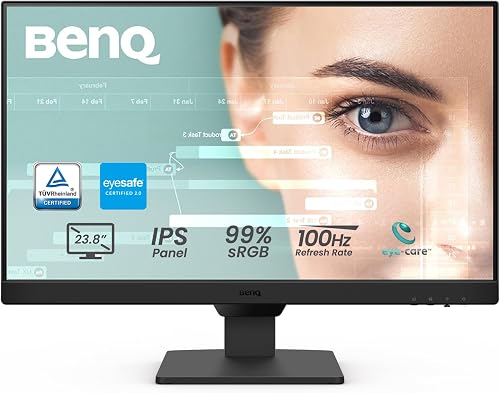
The winner overall is the BenQ GW2490 for most readers. It brings an IPS panel, a 100Hz refresh rate and BenQ's low blue light treatment to a 24-inch desk screen.
The MSI MAG 274CF X24 is the better buy if fast games matter more than reading comfort.
 Best for long work sessions
BenQ GW2490 24" Computer Monitor 100Hz FHD

MSI vs BenQ monitor: which brand should you buy?
BenQ is the stronger brand for a practical work setup, while MSI is the stronger brand for a mixed work and gaming desk. The split comes down to how each brand spends its design budget.
BenQ puts its effort into eye care. Its work monitors carry TÜV-certified flicker free backlights, low blue light plus and reading modes like ePaper Mode.
The GW2490 and GW2491 both add a 100Hz refresh rate and 99% sRGB color, which keeps documents and video looking right without oversaturating them. The GW2490 pairs that treatment with adaptive brightness, so the screen shifts with the room light instead of staying at one level all day.
MSI puts its effort into speed. The MAG 274CF X24 runs at 240Hz with a 0.5ms response time and FreeSync Premium.
The PRO MP243L E14 pairs a 144Hz refresh rate with an IPS panel and its own flicker free and low blue light certification. MSI also spreads a 1500:1 contrast ratio across the PRO MP243L E14 and lists 130% color coverage on the MAG, both steps past what a plain office screen offers.
Neither brand is the wrong choice. You just get more of what each one prioritizes.
If your monitor sits in front of you for eight hours of work and only an hour of games, BenQ's comfort features earn their keep. If the ratio flips, MSI's refresh rates do.
This comparison focuses on four models that fit a single-monitor desk. Our guide to whether ASUS is a good monitor brand covers a third option if you're still weighing makers.
BenQ vs MSI side by side
The two brands split on panel type and refresh rate, and the table below shows where. Read across each row to see which screen fits your desk.
| Feature | BenQ GW2490 | BenQ GW2491 | MSI MAG 274CF X24 | MSI PRO MP243L E14 |
|---|---|---|---|---|
| Panel | IPS | IPS | Rapid VA | IPS |
| Screen size | 24 in | 23.8 in | 27 in | 23.8 in |
| Resolution | 1920 x 1080 | 1920 x 1080 | 1920 x 1080 | 1920 x 1080 |
| Refresh rate | 100Hz | 100Hz | 240Hz | 144Hz |
| Color gamut | 99% sRGB | 99% sRGB | 130% | 102% |
| Contrast ratio | 1000:1 | 1000:1 | 100000000:1 | 1500:1 |
| Adaptive sync | FreeSync | FreeSync | FreeSync Premium | FreeSync |
| Built-in speakers | Yes | No | No | No |
| VESA mount | Wall mount | Wall mount | 100 x 100 | 100 x 100 |
| Eye-care focus | Low blue light plus | TÜV-certified, ePaper Mode | AI Vision, less blue light | TÜV-certified flicker free and low blue light |
The refresh rate row is the quickest way to sort these screens. Anything at 100Hz or above feels smoother than a standard 60Hz office monitor.
The 144Hz and 240Hz MSI models go further for motion-heavy content.
Panel type is the second sorting line. IPS panels keep color steady from an angle, which helps when two people watch the same screen.
A VA panel like the MAG 274CF X24 gives deeper blacks but shifts color when you view it from the side. The BenQ models and the PRO MP243L E14 all use IPS, so their color holds up when you lean over to show someone a document.
The size row matters too. Three of the four screens land between 23.8 and 24 inches, which is the sweet spot for a single-monitor desk at normal viewing distance.
The MAG 274CF X24 pushes to 27 inches, so check your desk depth before you buy.
Our Dell vs Samsung monitor comparison covers how two other brands handle the same trade-offs if you want more context.
Which brand has better eye care for long work sessions?
BenQ has the edge on eye-care features, though MSI covers the basics on its work models. Both brands treat flicker and blue light as problems worth solving.
BenQ's low blue light plus filters shorter, higher energy blue-violet light while keeping color vivid. The GW2491 goes further with TÜV certification and an ePaper Mode that softens the screen for long reading.
The GW2490 adds adaptive brightness to its low blue light plus treatment. It adjusts to the room so you aren't squinting at a screen that's brighter than your surroundings.
MSI's PRO MP243L E14 is TÜV Rheinland certified for flicker free and low blue light too. It also includes an Eye-Q Check tool that walks you through a vision assessment to help you set the display up for long viewing.
That's a practical extra if you spend your day in front of one screen and want a check-in on how your eyes are holding up.
Where the two brands differ on comfort
BenQ treats comfort as a reading problem. Its modes exist to make text easier on the eyes, from ePaper Mode to the low blue light plus filter, and the work models build those features into the default setup.
The GW2490's adaptive brightness goes a step further by responding to the room rather than asking you to adjust a slider.
MSI treats comfort as a secondary feature on its gaming screens. The MAG 274CF X24 takes a lighter approach with a software blue light filter and AI Vision, which brightens dark scenes and saturates colors.
That's built for games more than for a spreadsheet marathon. The PRO MP243L E14 closes the gap with its TÜV certification, but it lacks a reading mode.
If screen comfort drives your choice, the BenQ GW2490 is the safer pick for a full workday. Our guide to whether LG monitors are good for work shows how another brand handles the same comfort brief.
Which brand is better for gaming and fast motion?
MSI wins on gaming hardware, with higher refresh rates and faster response times in this comparison. BenQ's work models here stay at 100Hz.
The MAG 274CF X24 leads with a 240Hz refresh rate and a 0.5ms GtG response time. That combination reduces tearing and motion blur in fast shooters.
FreeSync Premium adds adaptive sync so the screen matches your graphics card's output. The monitor is HDR Ready and uses AI Vision to pull detail out of dark areas, which helps in games with dim corridors or shadowed corners.
The PRO MP243L E14 steps down to 144Hz but keeps FreeSync and a 1ms response time. It's a good middle ground if you want one screen for work and weekend games.
Its IPS panel also holds color better than the MAG's VA when you view from an angle, so it works for couch co-op or a friend leaning in.
Both BenQ models run at 100Hz. That's smooth enough for video, scrolling and casual games, but it won't keep up with a 144Hz or 240Hz display in a competitive match.
The BenQ pair also lack FreeSync Premium, sitting at standard FreeSync instead.
If your desk is a pure gaming station, buy MSI. If games are a small part of your week, the refresh rate gap matters less than BenQ's comfort features.
Our BenQ vs Dell comparison shows where BenQ sits against another work-focused brand if gaming is only a side interest.
Which brand is better for color and image accuracy?
BenQ's work models target 99% sRGB, which suits documents and web content; MSI covers wider color ranges but tunes them for games. The right choice depends on what you produce.
The GW2490 and GW2491 both cover 99% of the sRGB color space. That's the color range most websites, documents and office software expect.
Colors look natural rather than pushed.
MSI lists 130% color gamut on the MAG 274CF X24 and 102% on the PRO MP243L E14. Wider coverage can make games and video pop, but it can also oversaturate ordinary work content unless the screen is tuned down.
The MAG's VA panel adds a very high contrast ratio, which deepens blacks in dark scenes but can crush fine shadow detail if the brightness is set high.
If you edit photos for the web or design documents, 99% sRGB is the more useful target. The BenQ models make that easier to hit without a calibration pass.
The IPS panel on both BenQ screens also keeps that color steady as you move your head.
If you watch a lot of video and play colorful games, the MSI screens' wider coverage gives you more to look at. Just expect to adjust saturation for work apps.
The PRO MP243L E14's 102% coverage sits closer to the sRGB target than the MAG's 130%, so it's the easier MSI model to live with for mixed use.
Our Dell vs Samsung monitor comparison covers how two other brands handle color targets if accuracy is your main concern.
Which brand gives you more ports and desk-friendly features?
The BenQ GW2490 is the most flexible for connecting devices, with two HDMI ports, DisplayPort and built-in speakers. The MSI screens keep connections simple.
The GW2490's input hotkey lets you switch between sources with a single press. That helps when a laptop and a desktop share the screen.
Built-in speakers mean one less cable and less desk clutter. The monitor also carries VESA certified media sync, which keeps HDR and refresh rates working properly with consoles and media players.
The GW2491 offers HDMI and DisplayPort but no speakers. The ultra slim bezel makes it easier to line up in a two-screen setup without a thick gap between panels.
The MAG 274CF X24 has HDMI and VGA ports plus VESA 100 x 100 mounting. The VGA port helps if you need to connect older hardware.
The PRO MP243L E14 also carries HDMI and VGA, and its HDMI 2.0 port supports HDMI-CEC, so one remote can control compatible devices. Both MSI screens mount on a 100 x 100 arm.
If you want to move the monitor onto an arm or wall bracket, all four models support mounting. The MSI models list 100 x 100 mounting explicitly, and the BenQ screens list wall mount support.
The PRO MP243L E14 adds a tilt range of -5 to 20 degrees, so you can angle it without reaching for a tool.
Who should buy which brand?
Buy BenQ for a work desk; buy MSI for a gaming or mixed desk. The four models here cover those needs without overlap.
Buy BenQ if you work or study at the screen
The BenQ GW2490 is the best fit for most people. Its 24-inch IPS panel, 100Hz refresh rate and low blue light plus treatment handle documents, spreadsheets and video calls well.
Built-in speakers and two HDMI ports keep the desk simple. Its 250 lm brightness is modest, so it does best in a room where you can control the light.
The GW2491 is the better pick for readers and writers. Its ePaper Mode and TÜV certification suit long sessions in text-heavy apps.
The slim bezel also helps if you'll add a second screen later. It runs on HDMI and DisplayPort and weighs 2.7 kg, light enough for most arms.
Buy MSI if you game or want speed
The MSI MAG 274CF X24 is the pick for a 27-inch screen that doubles as a gaming display. The 240Hz refresh rate and FreeSync Premium suit fast games, and the VESA mount makes desk placement easy.
Its AI Vision setting is handy for spotting enemies in dark scenes.
The MSI PRO MP243L E14 is the best all-round value here. It brings a 144Hz IPS panel with flicker free and low blue light certification at a 24-inch size.
It covers work and play without the gaming-only extremes of the MAG model. Its 1500:1 contrast ratio is higher than the BenQ pair, so text stays crisp while blacks stay deep.
The verdict on MSI vs BenQ monitors
Buy BenQ for a practical work setup and MSI for a mixed or gaming desk. For most readers the BenQ GW2490 is the better screen, because its IPS panel and eye-care features match how a work monitor gets used.
The split is clean. BenQ wins on reading comfort, sRGB color and built-in speakers.
MSI wins on refresh rate and motion handling, with the MAG 274CF X24 leading the way at 240Hz and the PRO MP243L E14 covering both needs at 144Hz.
Choose BenQ if your monitor sits in front of you for long workdays. Choose MSI if the same desk hosts fast games after hours.
If you want to compare more makers before you commit, our Dell vs Samsung monitor comparison and our BenQ vs Dell comparison both cover the same work-versus-play question.
Frequently asked questions
Is MSI or BenQ better for office work?
BenQ is the better fit for most office desks because its work models focus on IPS color, low blue light and reading modes. MSI still makes solid office screens like the PRO MP243L E14, so the deciding factor is whether you want BenQ's eye-care features or MSI's higher refresh rates.
Do MSI monitors have better refresh rates than BenQ?
MSI pushes refresh rates higher across its range, with models at 144Hz and 240Hz in this comparison. BenQ's work models here sit at 100Hz, which is smooth for documents and video but less suited to competitive gaming.
Can I use a gaming monitor like the MSI MAG 274CF X24 for work?
Yes. A 27-inch 1080p screen at 240Hz works fine for spreadsheets, writing and video calls.
The trade-off is a VA panel with narrower viewing angles than IPS, which matters more if you often look at the screen from the side.
Which brand has better eye-care features?
BenQ puts more eye-care technology into its work monitors, including TÜV-certified flicker free backlights, low blue light plus and an ePaper Mode on the GW2491. MSI also certifies its PRO MP243L E14 for flicker free and low blue light, so both brands cover the basics.
What size monitor should I buy for a work desk?
A 24-inch 1080p screen suits most desks at normal viewing distance, while a 27-inch screen gives more room for side-by-side windows. Check your desk depth first, since a larger screen pushed too close can make you turn your head to read across it.