Samsung vs BenQ Monitors: Which Brand to Buy? (November 2026)
Buy BenQ for eye care and a stand that adjusts; buy Samsung for a bent screen or a brighter picture. In this samsung monitor vs benq monitor choice, the higher-scored BenQ GW2490 wins for most work desks.
On this page (8 sections)
- Samsung vs BenQ: what actually separates them?
- Which brand has better eye care?
- Which brand gives you more usable ports?
- Flat or curved: which Samsung and BenQ shape fits your desk?
- Resolution and size: which brand handles 27 inches better?
- Which brand suits laptop and Mac users?
- Is BenQ or Samsung the better budget brand?
- Which Samsung or BenQ monitor should you buy?
Buy BenQ for eye care and a stand that adjusts; buy Samsung for a bent screen or a brighter picture. In this samsung monitor vs benq monitor choice, the higher-scored BenQ GW2490 wins for most work desks.
Both brands sell budget and mid-range IPS panels at similar sizes. The real split is in the extras: how they treat your eyes, what ports they carry and whether the screen is flat or curved.
We compared the specs on four 1080p models, two from each brand, to see which one suits a practical workspace. All four run at 100Hz and 1920x1080, and all four mount on a wall, so the differences live in the details.
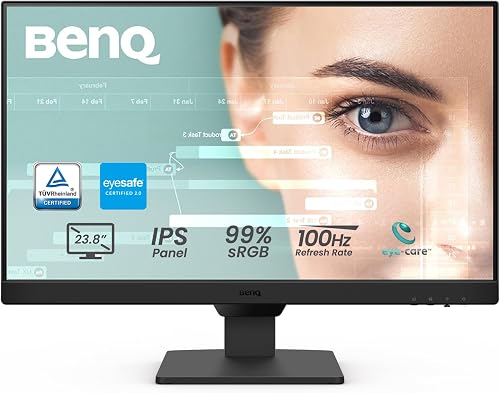 Best overall for work desks
BenQ GW2490 24" Computer Monitor 100Hz FHD

Samsung vs BenQ: what actually separates them?
BenQ builds budget screens around eye care; Samsung builds them around panel shape and contrast. The two brands overlap on resolution and refresh rate, then part ways.
Both make IPS panels with a 100Hz refresh rate, so scrolling looks smooth on either brand. BenQ adds Low Blue Light Plus and Flicker-Free across its screens, plus ePaper Mode on the GW2491.
Samsung leans toward more visible design touches, like a curved 1800R panel and a 3000:1 contrast ratio on the S36GD. It also uses D-Sub on some models, which older desktops still need.
A 1000:1 contrast ratio sits on the BenQ pair and the flat Samsung model. The curved S36GD triples that figure, which changes how dark scenes look in films and games.
The table below sums up the four models we compared.
| Model | Size | Panel | Refresh | Ports |
|---|---|---|---|---|
| BenQ GW2490 | 24 in | IPS, 99% sRGB | 100Hz | HDMI x2, DisplayPort |
| BenQ GW2491 | 23.8 in | IPS, 99% sRGB | 100Hz | HDMI, DisplayPort |
| Samsung 27" | 27 in | IPS | 100Hz | HDMI, D-Sub |
| Samsung S36GD | 27 in | LED, 1800R curve | 100Hz | HDMI, D-Sub |
All four top out at 250 nits of brightness. BenQ lists its figure as 250 lm and Samsung as 250 cd/m², but the practical result is the same: bright enough for a normal office, dim next to a sunlit window.
Which brand has better eye care?
BenQ has the stronger eye care package. Its Low Blue Light Plus filters short blue-violet light while keeping colors vivid, and Flicker-Free removes screen flicker at every brightness level.
The GW2491 goes further with TUV certification for its low blue light and Flicker-Free setup. It also adds ePaper Mode, which turns the screen toward a paper-like look for long reads.
Samsung is not without eye care. Its S30GD and S36GD both include a blue light filter and flicker-free tech, and the S36GD is TUV-certified for eye comfort.
Where the Samsung flat model fits
Samsung's flat 27 inch screen adds Game Mode and tilt adjustment alongside its eye care. Its blue light filter and flicker-free tech cover the basics for a long session, and the IPS panel keeps color steady as you move your head.
What it lacks is BenQ's extra layer. There is no ePaper Mode and no listed certification on that model, so the eye care story is simpler.
Where the BenQ pair pulls ahead
The GW2490 and GW2491 both list Low Blue Light Plus and Flicker-Free, and the GW2491 pairs them with TUV certification and ePaper Mode.
The difference is depth. BenQ tunes its whole budget range around long sessions, while Samsung treats eye care as one feature among many.
BenQ also lists the filters as part of the monitor's core feature set, not an optional picture preset.
If you stare at documents and spreadsheets for 8 hours, that gap matters. The Samsung ViewFinity S7 review shows how Samsung handles eye care on a higher-tier model.
Which brand gives you more usable ports?
BenQ gives you the more flexible connection set on these models. The GW2490 carries two HDMI ports and a DisplayPort, so a laptop and a desktop can both stay plugged in.
An input hotkey lets you switch between them with one click. That's handy when you move between work and personal devices without reaching for cables.
The GW2491 keeps it simpler with one HDMI and one DisplayPort. That covers most laptop docks and desktop cards without extras.
Samsung pairs HDMI with D-Sub on both models here. D-Sub helps if you keep an older office PC, but it caps the picture at an analog signal.
Samsung lists only one component output on the flat model and HDMI plus D-Sub as the included ports.
Modern laptops and docks rarely use D-Sub. If you plan to connect a current laptop, count the HDMI ports on each screen before you buy.
The flat Samsung has a single HDMI input, so a second device means unplugging something.
Flat or curved: which Samsung and BenQ shape fits your desk?
BenQ sells flat screens; Samsung offers both flat and curved. A curved 1800R screen wraps around your view, while a flat panel keeps straight lines straight.
The Samsung S36GD uses the 1800R curve. That wraps the edges toward you, which adds depth in games and films and cuts peripheral distraction.
The trade-off shows up in documents. Horizontal lines look slightly bowed on a curved screen, which can bother anyone working in spreadsheets or design tools.
Samsung's flat 27 inch model avoids that problem. It keeps the larger 27 inch view without the distortion, so mixed work stays comfortable.
BenQ's two models are both flat. The GW2490's thin bezel and 24 inch size keep it compact on a smaller desk, while the GW2491's ultra slim border helps in a two-screen setup.
Its frameless design is aimed at cutting distractions when you focus on the screen.
The curved Samsung also lists G-Sync compatibility, while the BenQ pair and the flat Samsung list FreeSync. That matters if you game on an Nvidia card and want adaptive refresh to smooth out frame drops.
If you run two monitors side by side, curved screens can help. Our dual monitor setup guide covers the spacing and angles that keep both screens usable.
Resolution and size: which brand handles 27 inches better?
BenQ's smaller screens keep 1080p sharp; Samsung's 27 inch models stretch it. At 1920x1080, pixel density falls as the screen grows, and text softens at 27 inches.
The BenQ GW2490 is 24 inches, and the GW2491 is 23.8 inches. At that size, 1080p looks crisp and icons stay a comfortable size without scaling.
The GW2491's 3.07 pixel pitch puts each pixel close enough together for clean edges on text.
Both Samsung models here are 27 inches at the same 1080p. The larger view shows more area, but individual letters look less tight.
You notice it most in small fonts and long documents.
That's a fair trade for video and casual use. For dense text, the smaller BenQ screens are easier on the eyes across a full workday.
Both BenQ models also list 99% sRGB coverage. That means photos and design work show accurate color, while the Samsung flat model focuses on consistent IPS color across angles without a stated gamut figure.
The curved Samsung lists 95% color coverage and a 3000:1 contrast ratio.
Size and density matter as much as brand. Our guide to screen size and sharpness explains the resolution each size needs to stay crisp.
Which brand suits laptop and Mac users?
BenQ's HDMI and DisplayPort pair suits most laptops and docks; Samsung's D-Sub is the weaker fit for modern Macs. A recent laptop usually connects over HDMI or USB-C to DisplayPort.
The GW2490's two HDMI ports let you keep a work laptop and a personal machine connected. Its DisplayPort handles a desktop card or a dock with a DP output.
The GW2491 offers one HDMI and one DisplayPort, enough for a single laptop plus a desktop if you swap cables. Its TUV-certified panel also helps when you read long pages on a laptop mirrored to a bigger screen.
Samsung's HDMI and D-Sub combo covers an HDMI laptop fine. D-Sub only helps if your old hardware still has a VGA output.
Mac users should check adapters. A USB-C to HDMI adapter works with any of these screens, while USB-C to DisplayPort suits the two BenQ models.
On the Samsung pair, the only digital input is HDMI, so a Mac with no HDMI port needs that adapter.
Our laptop and Mac monitor guide covers the adapters and cables that keep a single-cable desk tidy.
Is BenQ or Samsung the better budget brand?
Both brands are strong in the budget tier, but they spend the money differently. BenQ puts it into eye care and ports; Samsung puts it into panel shape and contrast.
The BenQ pair carries 100Hz IPS panels, 99% sRGB and low blue light for a modest price tier. Nothing in the specs suggests a premium build, but the feature set fits daily work.
The GW2490 adds built-in speakers so a desk stays uncluttered.
Samsung's budget screens add a curved option and a higher 3000:1 contrast ratio on the S36GD. That contrast helps dark scenes look deeper in films and games.
The flat Samsung brings a 27 inch view and IPS color at a budget tier.
Weight tells you a little about build. The BenQ GW2490 lists 8.4 pounds and the Samsung S36GD matches it at 8.4 pounds.
The flat Samsung is lighter at 6.4 pounds. The GW2491 lists its weight as 2.7 kg.
If you also compare against Dell, the Dell vs Samsung monitor guide shows where Dell's office range sits against Samsung's.
Brand reputation matters less than the model. A 24 inch BenQ with eye care beats a 27 inch Samsung at 1080p for pure document work, and vice versa for a curved entertainment screen.
For a broader look at another budget brand, our piece on whether ASUS is a good monitor brand weighs its office range against these two.
Which Samsung or BenQ monitor should you buy?
Pick BenQ for a work desk with long screen hours. The BenQ GW2490 is the best overall pick here: 24 inches of sharp 1080p, a 100Hz IPS panel, 99% sRGB, eye care and two HDMI ports plus DisplayPort.
Choose the BenQ GW2491 if you read and write all day. Its ePaper Mode and TUV certification suit long documents, and the thin bezel helps in a multi-screen setup.
Go Samsung when you want more screen or a curve. The Samsung 27 inch flat model gives a larger view and an IPS panel for mixed work, though 1080p is stretched at that size.
Its Game Mode and tilt adjustment make it easier to angle the screen.
Pick the Samsung Essential S3 27 Curved (S36GD) for films, games and a more immersive desk. Its 1800R curve and 3000:1 contrast outweigh the document distortion for that kind of use, and its G-Sync compatibility helps on Nvidia cards.
Most readers shopping a samsung monitor vs benq monitor for a practical work setup should start with the GW2490. If your desk is entertainment-first, the curved Samsung earns its place.
For anyone who reads dense text all day, the GW2491 is the safer BenQ pick.
Frequently asked questions
Is BenQ a better monitor brand than Samsung?
BenQ is the better pick for eye care and office work, since its budget IPS screens carry low blue light and flicker-free tech. Samsung is the better pick for curved screens and higher contrast.
Match the brand to the feature you need rather than calling one better overall.
Are Samsung monitors good for office work?
Yes. The Samsung 27 inch IPS model has a 100Hz refresh, a blue light filter and consistent color from any angle.
Its 1920x1080 resolution is stretched thin at 27 inches, so text looks sharper on the smaller 24 inch BenQ.
What does the BenQ eye care feature do?
BenQ's Low Blue Light Plus filters the shorter blue-violet light that tires the eyes over long sessions, and Flicker-Free removes the flicker that causes headaches. The GW2491 adds ePaper Mode for reading long documents with less strain.
Do these monitors have built-in speakers?
Only the BenQ GW2490 lists built-in speakers, with an HDMI and DisplayPort connection for audio. The other three models have no speakers in their listed features, so plan on desk speakers or headphones for sound.
Can I mount these monitors on a monitor arm?
All four list wall-mount support, so a VESA monitor arm is an option on any of them. A VESA mount helps when the included stand does not adjust and you want the screen at eye height.