Samsung vs ASUS Monitors: Which Brand to Buy? (November 2026)
ASUS wins for color-critical and gaming work, while Samsung wins for simple, affordable everyday setups. In this Samsung monitor vs ASUS monitor comparison, your workload and desk space decide more than the logo on the bezel.
On this page (8 sections)
- Samsung monitor vs ASUS monitor: the quick verdict
- The two brands side by side
- Resolution and sharpness decide the brand for text work
- Color accuracy favors ASUS for creative work
- Refresh rate and motion suit ASUS for gaming
- Desk fit and ergonomics split the brands
- Who should buy which brand
- The verdict: ASUS wins overall, Samsung wins on simplicity
ASUS wins for color-critical and gaming work, while Samsung wins for simple, affordable everyday setups. In this Samsung monitor vs ASUS monitor comparison, your workload and desk space decide more than the logo on the bezel.
ASUS puts Fast IPS panels, wide color coverage and high refresh rates in its TUF and ProArt lines. Samsung leans on slim everyday screens with steady IPS color and gentle curve options in its Essential range.
Both brands cover the 27-inch desk monitor well. The split appears once you ask what the screen has to do all day.


Samsung monitor vs ASUS monitor: the quick verdict
Pick ASUS for color accuracy, QHD sharpness or fast gaming, and pick Samsung for a basic desk screen that stays affordable. The ASUS TUF Gaming VG27AQ3A takes the overall win here because it covers both work and play at 2560 x 1440.
The ASUS TUF VG27AQ3A earns the top score of 9.6. Its 27-inch QHD Fast IPS panel runs at 180Hz and covers 130% sRGB, so text stays crisp and motion stays smooth.
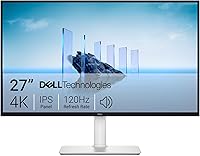
Samsung's strongest everyday screen in this group is the 27-inch S30GD. Its IPS panel and 100Hz refresh rate make it a calm pick for documents and video calls at a lower tier.
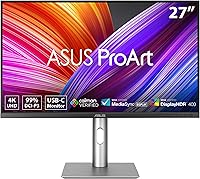
The ProArt PA278QV is the specialist. ASUS builds it for editors who need Calman Verified color and an adjustable stand rather than speed.
If you only need one answer: ASUS for accuracy and resolution, Samsung for a simple second screen or starter desk.
The two brands side by side
ASUS spreads across gaming, creative and office screens, while Samsung keeps its Essential line focused on value. The table below lines up the four models we compared for this brand matchup.
| Feature | ASUS (TUF and ProArt) | Samsung (Essential S30GD and S36GD) |
|---|---|---|
| Panel type | Fast IPS, IPS | IPS, curved LED |
| Top resolution here | 2560 x 1440 (QHD) | 1920 x 1080 (FHD) |
| Refresh rate | Up to 180Hz | 100Hz |
| Color coverage | 130% sRGB, 100% sRGB/Rec. 709 | Standard IPS color |
| Stand adjustment | Tilt, pivot, swivel, height (ProArt) | Tilt only |
| Best fit | Creative work and gaming | Everyday office and video |
The ASUS pair sits at the sharper end. The TUF model runs QHD at 180Hz, and the ProArt runs QHD with factory calibration.
Samsung's two screens stay at Full HD and 100Hz. That keeps them light and affordable, but 27 inches at 1920 x 1080 shows softer edges than QHD.
Stand design splits the brands clearly too. The ProArt gives you full ergonomic adjustment, while the Samsung models here adjust for tilt.
| Product | Best for | Resolution | Refresh rate | Panel | Our score |
|---|---|---|---|---|---|
| ASUS TUF Gaming VG27AQ3A 27 Inch 1440p | gaming and mixed work | 2560 x 1440 | 180Hz | Fast IPS | 9.6 |
| Samsung 27" | light office work | 1920 x 1080 | 100Hz | IPS | 9.2 |
| ASUS ProArt PA278QV | photo and video editing | 2560 x 1440 | IPS | 8.1 | |
| Samsung Essential S3 27 Curved (S36GD) | immersion on a budget | 1920 x 1080 | 100Hz | Curved LED | 8.0 |
Resolution and sharpness decide the brand for text work
ASUS wins this round for desk work at 27 inches because both ASUS models here are QHD. At 27 inches, 2560 x 1440 gives you noticeably crisper text and more room for side-by-side windows than 1920 x 1080.
The ASUS TUF VG27AQ3A and the ASUS ProArt PA278QV both run 2560 x 1440 on a 27-inch panel. That pixel density suits spreadsheets, long documents and split-screen layouts.
Samsung's S30GD and S3 Curved both top out at 1920 x 1080. That resolution is fine on a 22 or 24-inch screen, but stretched across 27 inches it looks coarser.
When Full HD is enough
Full HD makes sense when the monitor sits a little further back or serves as a secondary display. Samsung's 27-inch panels keep the price lower and the cabinet light.
If you mostly watch video or glance at chat windows, the extra sharpness of QHD may not earn its place. For eight hours of text a day, it usually does.
The Samsung pair also leans on its own strengths at this resolution. The S30GD uses an IPS panel so colors stay bright and clear when you change angles, while the S3 Curved turns the lower pixel count into a lighter, slimmer cabinet.
Our guide to whether ASUS is a good monitor brand for office work digs into the office side of the lineup. It covers the features that matter when spreadsheets fill the screen.
Color accuracy favors ASUS for creative work
ASUS wins for photo and video editing because the ProArt PA278QV arrives calibrated. Its Calman Verified rating and Delta E under 2 mean the color you see is close to the intended color before you touch a setting.
The ProArt also covers 100% sRGB and 100% Rec. 709.
Editors working in web and video color spaces get full coverage of both, which matters when you grade footage or prep files for print and web.
The TUF VG27AQ3A covers 130% sRGB. That wider gamut gives games and video extra punch, though a wider gamut needs color management for accurate edits.
Samsung's Essential panels deliver steady IPS color across the screen. They're tuned for everyday viewing rather than calibrated accuracy, so a Samsung screen suits general office color.
Color settings worth knowing
The ProArt includes ProArt Preset and ProArt Palette tools for adjusting color, brightness and black levels. That gives editors room to match a project without extra software.
The bundled color pre-calibration report is also handy, because it shows the factory reading for your exact unit.
The Samsung S30GD includes Game Mode for instant contrast and color changes. It's useful for casual gaming, but it's not a substitute for a calibrated profile.
Samsung also lists a color gamut figure of 95% on the S3 Curved, which hints at solid everyday color without the full creative coverage ASUS offers.
The ASUS TUF adds HDR-10 support on top of its wide gamut. That lifts bright and dark areas for more depth in games and streaming, even though it is not a substitute for a calibrated creative workflow.
If you're weighing this brand against another calibrated option, our Dell vs Samsung monitor comparison shows how Samsung holds up against a rival known for office screens.
Refresh rate and motion suit ASUS for gaming
ASUS wins for gaming because the TUF VG27AQ3A runs at 180Hz with FreeSync Premium and G-Sync Compatible support. That combination covers both AMD and NVIDIA graphics cards without fuss.
Its ELMB Sync technology lets low motion blur and variable refresh work together. The result is sharp motion without ghosting or tearing at high frame rates.
The 1ms response time on the Fast IPS panel helps fast-paced games stay clear. HDR-10 support also lifts bright and dark areas for more depth.
Samsung's 100Hz screens are smoother than a standard 60Hz office monitor. The S30GD and the S3 Curved both reduce lag and motion blur for casual play and video.
Samsung does note that both ship at 60Hz by default, so you have to switch to 100Hz in the monitor settings to get the full benefit.
Which refresh rate you need
Pick 180Hz if you play competitive shooters or want the smoothest scroll. Pick 100Hz if you game now and then and mostly use the screen for work.
The Samsung S3 Curved pairs its 100Hz refresh with a 3000:1 contrast ratio. That deeper contrast helps dark scenes and movies more than speed does.
The S3 Curved also lists G-Sync Compatible support, so NVIDIA cards get a smoother experience than its price tier suggests.
Our Samsung ViewFinity S7 review covers how Samsung's higher line handles creative and office work. It's a useful next step if you want Samsung color with more features.
Desk fit and ergonomics split the brands
ASUS wins for adjustability because the ProArt stand tilts, pivots, swivels and changes height. Samsung's Essential models here adjust for tilt, which limits how you line up the screen with your eyes.
The ASUS TUF VG27AQ3A uses a 100 x 100 mm mount, so a monitor arm is a simple swap. Its cabinet weighs 4.6 kg and the stand has a gaming look that may not suit every office.
The Samsung S30GD has a super-slim design and ultra-thin bezels. It's light at 6.4 pounds and easy to move between desks.
Its footprint measures 24.12 x 7.89 inches, which leaves more room for a keyboard than a curved screen of the same size.
The Samsung S3 Curved uses an 1800R curve. That wraps the view and adds immersion, but the curve also takes more desk depth than a flat screen.
It weighs 8.4 pounds, heavier than the flat Samsung despite the similar panel size.
Planning a two-screen desk
A flat ASUS screen is easier to pair with a second display because the edges line up straight. A curved Samsung screen works better as a single center screen.
Check the footprint before you buy either. The Samsung S3 Curved measures 24.5 x 9.2 inches on the desk, so leave room for the curve to clear your keyboard.
The ASUS ProArt brings more than a stand. It includes a USB hub and a wide port selection covering DisplayPort, HDMI, DVI-D and Mini DisplayPort, so laptops and storage drives plug straight into the screen.
The TUF model keeps it simpler with HDMI and DisplayPort plus a 3.5mm audio jack and built-in speakers.
If you're comparing ASUS against another office brand, our ASUS vs Dell monitor comparison puts the ergonomics and port selection side by side.
Who should buy which brand
Buy ASUS if your monitor has to earn its keep with sharp text, accurate color or fast frames. Buy Samsung if you want a clean, affordable screen for light work and video.
Choose the ASUS TUF Gaming VG27AQ3A if you mix work and gaming on one screen. Its QHD resolution keeps documents crisp and its 180Hz panel keeps motion smooth.
Built-in speakers mean one less accessory on the desk, and the 100 x 100 mount leaves room for an arm later.
Choose the ASUS ProArt PA278QV if you edit photos or video and need calibrated color. The fully adjustable stand also helps during long editing sessions, and the included color pre-calibration report gives you a starting point for your own profiles.
ASUS backs it with three years standard warranty plus two more with online registration.
Choose the Samsung 27-inch S30GD if you need a dependable everyday screen for documents, email and video calls. Its IPS panel and 100Hz refresh rate keep the basics covered at a lower tier.
The 250 nits of brightness suit a room where you control the light.
Choose the Samsung Essential S3 27 Curved if you watch a lot of video or play casually and want an immersive screen. The 1800R curve and 3000:1 contrast do the heavy lifting, and the TÜV-certified eye comfort helps during long sessions.
A quick buyer checklist
- Pick ASUS for QHD text clarity at 27 inches.
- Pick ASUS ProArt for Delta E under 2 and full sRGB and Rec. 709 coverage.
- Pick Samsung for a slim, light cabinet and a simple setup.
- Pick Samsung S3 Curved for immersion and contrast.
- Check the stand adjustment and VESA pattern before you commit to long sessions.
- Confirm your graphics output can drive QHD if you choose ASUS.
The verdict: ASUS wins overall, Samsung wins on simplicity
The ASUS TUF Gaming VG27AQ3A is the better monitor for most readers in this Samsung monitor vs ASUS monitor matchup. Its QHD Fast IPS panel, 180Hz refresh and 130% sRGB cover sharp work and fast play in one screen.
The ASUS ProArt PA278QV is the pick for creative professionals who need calibrated color. Samsung still wins when simplicity and a lower price tier matter more than resolution and refresh rate.
The Samsung 27-inch S30GD is a solid starter screen for light office work. The S3 Curved is the more fun choice for video and casual gaming.
Use this rule: buy ASUS for accuracy, sharpness or speed, and buy Samsung for an easy everyday screen. Then match the model to your desk depth and stand needs.
Frequently asked questions
Is ASUS or Samsung better for office work?
ASUS is the better fit when you want sharp QHD text or accurate color, while Samsung suits a basic desk setup with a low budget. Pick ASUS if your work involves spreadsheets, design or long reading sessions at 27 inches.
Do Samsung and ASUS monitors use the same panels?
No, they source panels differently and tune them differently. ASUS leans on Fast IPS and wide color coverage in its TUF and ProArt lines, while Samsung uses IPS and curved VA-style panels across its Essential range.
Which brand is better for photo editing?
ASUS is the stronger pick for photo editing because the ProArt PA278QV arrives Calman Verified with Delta E under 2 and full sRGB and Rec. 709 coverage.
Samsung's Essential models focus on everyday color rather than calibrated accuracy.
Can I mount either brand on a monitor arm?
The ASUS TUF VG27AQ3A uses a 100 x 100 mm VESA mount. The Samsung models here list wall mounting as their support type, so check the exact mount pattern on the model you choose before you buy an arm.
Which brand has better eye comfort features?
Both offer blue light filters and flicker-free backlights. Samsung adds TÜV-certified eye comfort on the Essential S3 Curved, while ASUS builds Eye Care technology into the ProArt and TUF lines.