Samsung ViewFinity S7 Review: Worth It? (October 2026)
The Samsung ViewFinity S7 27 (S71H) suits office work that benefits from a sharp 4K picture and a 27 inch screen. It has HDMI and DisplayPort, while the Dell S2725QS adds a 120Hz refresh rate and adjustable stand features.
On this page (7 sections)
- Samsung ViewFinity S7 review: what stands out?
- How sharp is 4K on a 27 inch screen?
- What do HDR10 and the IPS panel mean for work?
- How does the Samsung compare with the LG 27US500-W?
- Is the Dell S2725QS a better alternative?
- What connections and setup should you expect?
- Is the Samsung ViewFinity S7 worth choosing?
The Samsung ViewFinity S7 27 (S71H) is a 4K monitor for office work that benefits from fine detail on a 27 inch screen. It combines an IPS panel, HDR10, HDMI and DisplayPort, with a 60Hz refresh rate.
Its strengths are straightforward: sharp resolution, wide viewing angles and eye comfort features. If smoother motion or more stand adjustments matter to you, compare the Dell S2725QS before choosing.
Samsung ViewFinity S7 review: what stands out?
The ViewFinity S7's main draw is 4K UHD resolution on a 27 inch IPS screen. That gives you a detailed workspace for documents, diagrams, images and other tasks where fine text or visual detail matters.
Samsung ViewFinity S7 27 (S71H): Best for detailed 4K work

- 27 in 4K UHD IPS display
- 60Hz refresh rate
- HDR10
- HDMI and DisplayPort
A 27 inch 4K IPS monitor with HDMI, DisplayPort, HDR10 and Eye Saver Mode. It fits desk work where fine detail matters more than a high refresh rate.
Pros
- 4K UHD resolution on a 27 in screen
- IPS panel with 178° viewing angle
- HDMI and DisplayPort connections
- Eye Saver Mode and flicker reduction
Cons
- 60Hz refresh rate
- No USB-C connection is specified
Samsung lists a 178° viewing angle for the IPS panel, which can help keep tones more consistent when you view the screen from off center. The monitor also includes HDR10 and Eye Saver Mode, plus HDMI and DisplayPort for connecting a computer.
This is a 60Hz display. It is a sensible match for everyday office tasks, but people who want more fluid movement while scrolling or playing games may prefer a monitor with a higher refresh rate.
Who should choose the Samsung ViewFinity S7?
Choose it if you want a 27 inch 4K monitor with HDMI and DisplayPort and don't need USB-C or a refresh rate above 60Hz. Its resolution suits detailed work, and the IPS panel supports viewing from different positions.
It may be less suitable if your setup depends on a single USB-C cable for both video and laptop charging. Samsung specifies HDMI and DisplayPort, so compare connection needs before buying.
How sharp is 4K on a 27 inch screen?
The Samsung's 3840 x 2160 resolution gives you four times the pixel count of Full HD. On a 27 inch screen, that can make small text and detailed images look crisp.
The high pixel density can also make menus and text appear small at default scaling. Your computer can enlarge interface elements while keeping the 4K resolution, so adjust scaling until text feels comfortable at your usual desk distance.
If you're weighing resolution against budget and text size, see our guide to 4K vs 1440p for work. For a broader size comparison, our 27 vs 32 inch monitor guide explains how screen area changes the desk experience.
What do HDR10 and the IPS panel mean for work?
The S7 combines an IPS panel with HDR10 support. Samsung describes HDR10 as a way to show darker blacks, brighter highlights and a wider range of color in supported content.
HDR support can be useful when viewing compatible media, but it doesn't by itself make this a professional color grading display. The available details don't specify a color accuracy certification, so creative work with strict color requirements calls for checking the requirements of your workflow.
The IPS panel's stated 178° viewing angle may help when you shift in your chair or share what's on screen with someone nearby. For routine documents, spreadsheets and web work, the resolution and screen size are likely more important than HDR.
How does the Samsung compare with the LG 27US500-W?
The Samsung and LG are closely matched on core display basics: both have 27 inch 4K IPS panels, 60Hz refresh rates, HDR10, HDMI and DisplayPort. Their included features and finishes help separate them.
LG 27US500-W: Best for a white desk setup

- 27 in 4K UHD IPS display
- 60Hz refresh rate
- HDR10
- HDMI and DisplayPort
A white 27 inch 4K IPS monitor with HDMI, DisplayPort, HDR10 and an adjustable tilt stand. OnScreen Control can split the workspace or change basic monitor settings.
Pros
- 4K UHD IPS display
- White finish
- OnScreen Control workspace options
- Tilt adjustment
Cons
- 60Hz refresh rate
- No USB-C connection is specified
Samsung includes Eye Saver Mode and Game Mode. LG offers OnScreen Control, which can split the workspace or adjust basic monitor settings, and its stand tilts for positioning.
The LG has a white finish, while the Samsung is black.
Choose the Samsung if its eye comfort tools and black finish suit your desk. Choose the LG if you prefer a white monitor or want to use its OnScreen Control software.
For a direct look at LG's monitor, read our LG 27US500-W review. You can also compare the two screens in our Dell S2725QS vs LG 27US500 comparison.
Is the Dell S2725QS a better alternative?
The Dell S2725QS is a stronger fit if you value a higher refresh rate and stand flexibility. It supports up to 120Hz and has height, pivot, swivel and tilt adjustment, while the Samsung is listed at 60Hz.
Dell S2725QS: Best for smoother motion
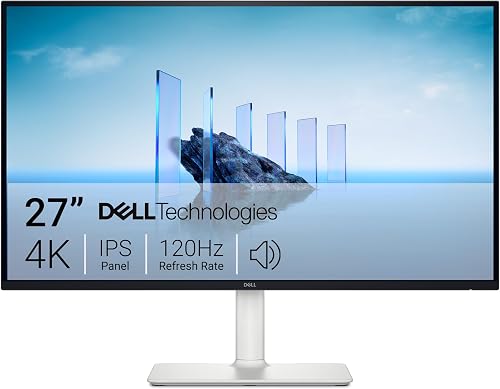
- 27 in 4K display
- Up to 120Hz refresh rate
- 99% sRGB
- Built-in speakers
A 27 inch 4K display with up to 120Hz refresh, FreeSync Premium and a stand with height, pivot, swivel and tilt adjustment. It also has built-in speakers.
Pros
- Up to 120Hz refresh rate
- Height, pivot, swivel and tilt adjustment
- Built-in speakers
- 99% sRGB color gamut
Cons
- No USB-C connection is specified
- LED display type rather than IPS in the provided model details
Dell also includes built-in speakers and cites 99% sRGB color gamut. The Samsung instead offers a 178° IPS viewing angle and Eye Saver Mode.
Both have 4K resolution and HDMI and DisplayPort, and neither has USB-C specified in the available details.
For everyday office tasks, pick the display whose features match your routine. If you scroll often, want smoother motion or need more ways to adjust screen position, the Dell has the clearer advantage.
Our Dell vs Samsung monitor guide looks at the two brands for work. If you want to compare more display options by use, start with our home office monitor guide.
What connections and setup should you expect?
The Samsung has HDMI and DisplayPort inputs, with one HDMI cable, one DisplayPort cable and a power cable included. Those options cover common desktop and laptop connections, though a laptop may need an adapter if it lacks matching ports.
This model doesn't specify USB-C. If you need a monitor to charge a laptop while carrying video, see how monitor USB-C charging works, then confirm the exact power and connection requirements for your computer.
Before setting it up, check that your desk has room for a 27 inch screen and its stand. Position the display so you can read comfortably without leaning forward, and adjust computer scaling if text looks too small.
Is the Samsung ViewFinity S7 worth choosing?
The Samsung ViewFinity S7 is a good choice when 27 inch 4K clarity and basic HDMI or DisplayPort connectivity are your priorities. Its IPS panel, HDR10 and Eye Saver Mode make a useful feature set for general office work.
Pick the Samsung for detailed 4K work at 60Hz. Pick the LG 27US500-W for its white finish and OnScreen Control, or the Dell S2725QS if you want up to 120Hz and a more adjustable stand.
Frequently asked questions
Is the Samsung ViewFinity S7 good for office work?
The Samsung ViewFinity S7 27 (S71H) is a good fit for office work where 4K detail, a 27 inch screen and standard HDMI or DisplayPort connections are useful. Its 60Hz refresh rate is suited to ordinary desktop tasks, while people who want smoother motion can compare it with a higher refresh rate option such as the Dell S2725QS.
Does the Samsung ViewFinity S7 have USB-C?
The Samsung ViewFinity S7 27 (S71H) has HDMI and DisplayPort connections, and USB-C is not specified for this model. If you need a single cable for video and laptop charging, check the monitor's connection details carefully and compare it with a display that clearly supports USB-C power delivery.
Is 4K worth it on a 27 inch monitor?
A 27 inch 4K monitor can show fine text and detailed images at 3840 x 2160 resolution. The trade-off is that interface elements may appear small at default scaling, so adjust your computer's display scaling to suit your eyesight and viewing distance.
Compare it with 1440p for office work if you prefer larger interface elements.
What is the difference between the Samsung ViewFinity S7 and LG 27US500-W?
Both are 27 inch 4K IPS monitors with 60Hz refresh rates, HDR10, HDMI and DisplayPort. The Samsung includes Eye Saver Mode and Game Mode, while the LG has OnScreen Control and an ergonomic tilt stand; the LG also has a white finish.
Choose based on the features and desk style you value.



