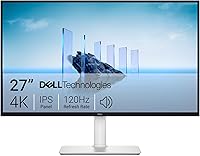
Samsung vs ViewSonic Monitors: Which Brand to Buy? (November 2026)
Pick ViewSonic when you want a sharp IPS panel with HDMI and VGA and a low price; pick Samsung when you want a curved or larger flat screen with the eye comfort features it advertises. In this Samsung vs ViewSonic monitors comparison, the winner overall for most work desks is the ViewSonic VS2447M.
On this page (9 sections)
- Quick verdict: which brand wins for a work desk?
- Samsung vs ViewSonic side by side
- IPS vs curved LED: which panel suits your work?
- Screen size and resolution: 24, 27 or 32 inches?
- Ports and connectivity: which brand fits your setup?
- Eye comfort and long sessions: what each brand offers?
- Who should buy which brand?
- Setup and desk fit for each brand
- Which brand should you pick?
Pick ViewSonic when you want a sharp IPS panel with HDMI and VGA and a low price; pick Samsung when you want a curved or larger flat screen with the eye comfort features it advertises. In this Samsung vs ViewSonic monitors comparison, the winner overall for most work desks is the ViewSonic VS2447M.
The two brands overlap a lot at 1080p. Both sell 24 inch and 32 inch screens with blue light filters and flicker reduction.
The real split is in panel type, screen shape and ports.
We checked the specs and features of four screens from the two brands. Here is how the Samsung vs ViewSonic choice shakes out for a practical work setup.
 Best for most work desks
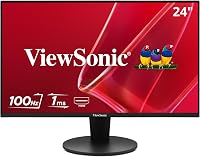
ViewSonic VS2447M 24 Inch 1080p Computer Monitor

Quick verdict: which brand wins for a work desk?
ViewSonic wins for most work desks because the VS2447M combines an IPS panel, wide angles and a 120Hz variable refresh rate at 24 inches. Samsung wins when you want a curved 27 inch screen or a 32 inch flat screen with borderless edges.
The ViewSonic VS2447M scores 9.6 here. Its 1920 x 1080 IPS panel gives wide 178-degree viewing angles and 300-nit brightness.
That helps when you share a screen or sit slightly off-center.
Samsung's Essential S3 Curved scores 8. The 1800R curve wraps around your view, and Samsung says the TÜV-certified eye comfort reduces blue light and flicker.
That suits a single wide desk.
The Samsung 32 Flat scores 7.2 and the ViewSonic VX3276-MHD scores 6.9. Both are 32 inch 1080p screens with borderless or slim bezels.
They suit bigger desks and living room setups.
If you already know the brand you want to compare against Samsung, our Dell vs Samsung monitor comparison covers the other big office name. The LG vs Samsung monitor comparison covers Samsung's other main rival.
Samsung vs ViewSonic side by side
The table shows how the four screens differ in panel, size, shape, refresh rate and ports. Read the panel and port rows first, since those decide most of the experience.
| Feature | ViewSonic VS2447M | Samsung Essential S3 Curved | Samsung 32 Flat | ViewSonic VX3276-MHD |
|---|---|---|---|---|
| Size | 24 in | 27 in | 32 in | 32 in |
| Panel | IPS | Curved LED | Flat LED | IPS |
| Resolution | 1920 x 1080 | 1920 x 1080 | 1920 x 1080 | 1920 x 1080 |
| Refresh rate | 100Hz, 120Hz VRR | 100Hz | 75Hz | 75Hz |
| Brightness | 300 nits | 250 cd/m² | 250 cd/m² | 250 cd/m² |
| Ports | HDMI, VGA | HDMI, D-Sub | HDMI, DisplayPort | HDMI, DisplayPort, VGA |
| Extra | Height adjustment | TÜV eye comfort | Borderless edges | ViewMode presets |
The ViewSonic VS2447M is the only one in this group with height adjustment and the only one rated at 300 nits. That matters if your desk sits near a window or you share the screen.
Samsung's two screens are both 250 cd/m². That's fine for a typical office or evening desk, but you'll want to control glare if the sun hits your screen.
Ports split cleanly. ViewSonic gives you VGA on both of its screens, which helps with older office PCs.
Samsung gives you DisplayPort on the 32 Flat and D-Sub on the curved Essential S3.
IPS vs curved LED: which panel suits your work?
IPS panels like ViewSonic's keep colors and contrast steadier when you move around the desk, while the Samsung curve trades flatness for immersion. Choose IPS for shared screens and color-sensitive work, and the curve for a single immersive desk.
The ViewSonic VS2447M uses a SuperClear IPS panel. ViewSonic lists 178-degree viewing angles and a 3000:1 contrast ratio.
In practice, the wide angle means a colleague standing beside you still sees a clear image.
The Samsung Essential S3 is a curved LED screen with an 1800R radius. Samsung says the wrap-around shape widens the view and cuts peripheral distraction.
That's a real benefit for one person sitting centered at a desk.
The Samsung 32 Flat uses a flat LED panel with a 4000:1 contrast ratio. The ViewSonic VX3276-MHD is IPS with a 1200:1 ratio.
Higher contrast helps dark scenes pop, while IPS generally holds color better across angles.
For spreadsheet, document and presentation work, IPS is the safer default. For a desk where you watch a lot of video, the curve and the deeper contrast of the Samsung pair can feel more engaging.
Screen size and resolution: 24, 27 or 32 inches?
A 24 inch screen at 1080p looks sharp and saves desk space; 27 and 32 inches give more room but show pixels more easily at 1080p. Pick the size around your desk depth and how many windows you keep open.
The ViewSonic VS2447M is 24 inches. At 1080p that's a pixel density of about 92 pixels per inch, which looks crisp at normal viewing distance.
It's the easiest screen to fit on a small desk or a shared table.
The Samsung Essential S3 Curved is 27 inches. The extra width helps when you keep two documents side by side.
The 1800R curve makes the far edges feel closer to your eyes.
Both 32 inch screens spread 1080p across a bigger area. Pixels are more visible up close, so sit a little further back.
In return you get a lot more screen for wide timelines, browsers and video.
If you want more detail than 1080p gives at 32 inches, look at higher-resolution panels in our Samsung ViewFinity S7 review. It covers a sharper Samsung screen for serious work.
Ports and connectivity: which brand fits your setup?
ViewSonic covers both old and new PCs by including VGA on both screens, while Samsung offers DisplayPort on its flat model and D-Sub on the curved one. Check what your computer and laptop output before you choose.
The ViewSonic VS2447M gives you HDMI, VGA and audio in and out. It also has dual 2W speakers.
That's enough to connect a desktop PC, a laptop and a pair of headphones without extra gear.
The ViewSonic VX3276-MHD adds DisplayPort on top of HDMI and VGA. Three inputs make it easy to keep a work laptop and a home console connected at once.
ViewSonic also ships an HDMI cable in the box.
Samsung's Essential S3 Curved offers HDMI and D-Sub. HDMI is the modern connection, and D-Sub keeps an older office PC in play.
It ships with an HDMI cable and a power cable.
The Samsung 32 Flat uses HDMI and DisplayPort. That's the cleanest pair for a modern desktop, since DisplayPort carries the full signal to the screen.
It doesn't include VGA, so an older machine needs an adapter.
Eye comfort and long sessions: what each brand offers?
Both brands advertise blue light reduction and flicker-free backlights, but the details differ. Samsung's Essential S3 carries TÜV certification, while ViewSonic lists Flicker-Free and Low Blue Light as named features.
The ViewSonic VS2447M has Flicker-Free and Low Blue Light features, plus an anti-glare surface. The anti-glare coating matters on a desk near a window or under overhead lights.
It reduces distracting reflections during long sessions.
ViewSonic also lists a Blue Light Filter on the VX3276-MHD, along with ViewMode presets. You can switch to Text mode for reading and Movie mode for video.
That gives you a quick way to tune the screen to the task.
Samsung's Essential S3 uses eye comfort technology certified by TÜV. Samsung says it reduces eye strain by minimizing blue light and reducing screen flicker.
The curved shape also keeps the edges at a more even distance from your eyes.
Samsung's 32 Flat uses Flicker Free and Eye Saver Mode. Those reduce screen flicker and cut emitted blue light for long computing sessions.
Brightness is 250 cd/m² on both Samsung screens.
None of these features replace good habits. Take breaks and adjust brightness to the room.
If you work long hours and get headaches, an eye doctor is the right person to ask.
Who should buy which brand?
Buy ViewSonic if you want wide viewing angles, both HDMI and VGA and the sharpest all-round value at 24 inches; buy Samsung if you want a curved or big flat screen with borderless edges. Your desk size and the devices you connect decide the rest.
Buy ViewSonic for a shared or small desk
The ViewSonic VS2447M is the best fit for most readers. Its 24 inch IPS panel holds color across wide angles, so a colleague or family member beside you still sees the screen clearly.
The height adjustment is unusual at this price and size. You can raise the screen to eye level instead of stacking it on books.
That matters for neck comfort over a long day.
The VX3276-MHD suits a living room desk or a bedroom setup that doubles as a TV. Its ViewMode presets and three inputs make it easy to switch from spreadsheets to streaming.
Its slim bezels look neat on a shelf or in a corner.
Buy Samsung for a curved or large flat screen
The Samsung Essential S3 Curved fits a single wide desk where you want the screen to fill your view. The 1800R curve plus 100Hz refresh keeps scrolling smooth and pulls your attention to the center.
The Samsung 32 Flat fits a big desktop or a wall mount. Its three-sided borderless design lines up cleanly with a second screen.
HDMI and DisplayPort cover modern PCs without adapters.
Samsung's two models are also worth a look if you keep the screen in a room where you watch a lot of video. The curve and the higher contrast ratios suit dark scenes better than the flatter IPS approach.
If you're also weighing office-focused brands beyond these two, our guide to whether ASUS is a good monitor brand is a useful next read. It covers where ASUS sits against the same desk needs.
Setup and desk fit for each brand
ViewSonic's 24 inch screen needs the least desk depth, while the 32 inch models need more room and a wider viewing distance. Plan the desk before you order either brand.
The VS2447M measures about 21.2 inches wide and 16.2 inches tall on its stand, at 7.4 inches deep. That fits a compact desk or a corner without crowding a keyboard and notebook.
The Samsung Essential S3 Curved is about 24.5 inches wide and 18.4 inches tall. The curve adds a little visual width, so leave some space at the sides for papers and a lamp.
The 32 inch screens are roughly 28 inches wide. The Samsung 32 Flat measures about 28.1 inches wide and 21 inches tall.
A 32 inch screen at 1080p wants a viewing distance of about 3 feet or more for comfortable viewing.
All four models list wall-mount support except the VS2447M, which lists a 100 x 100mm mount. That gives you the option to free up desk space with an arm.
Measure your arm's reach before you commit.
Which brand should you pick?
For most readers the ViewSonic VS2447M is the best buy in this Samsung vs ViewSonic monitors comparison, thanks to its IPS panel, 120Hz variable refresh and both HDMI and VGA. Pick Samsung instead when a curved 27 inch screen or a borderless 32 inch flat screen matters more than raw panel quality.
The VS2447M wins on viewing angles, brightness at 300 nits and port flexibility. Its 9.6 score reflects how well it covers a typical work desk with documents, video calls and some light gaming.
Choose the Samsung Essential S3 Curved if you sit alone at a wide desk and want an immersive, wraparound screen. Choose the Samsung 32 Flat for a large borderless setup or a wall mount.
Choose the ViewSonic VX3276-MHD if your desk doubles as a TV and you want IPS colors in a slim frame.
Measure your desk depth and list your devices' ports first. Then match the brand to your room, and you'll end up with a screen you keep for years.
Frequently asked questions
Are Samsung monitors better than ViewSonic?
Neither brand is better across the board. Samsung leans on curved shapes, TÜV-certified eye comfort and borderless flat designs, while ViewSonic leans on IPS panels with wide angles and both HDMI and VGA.
For a plain 24 inch work screen, the ViewSonic VS2447M scores highest here.
Is a curved or flat monitor better for office work?
A flat screen is easier to line up next to a second monitor and gives a truer view for spreadsheets. A curved screen like the Samsung Essential S3 wraps more closely around your view and reduces peripheral distraction, which suits a single wide desk more than a multi-screen setup.
Do ViewSonic monitors work with Mac laptops?
ViewSonic lists laptop as a compatible device for the VS2447M, and its HDMI port is the usual way to connect a Mac. You will need the right adapter or cable for your Mac model, since the monitor ships with an HDMI cable and VGA and audio ports.
What refresh rate do I need for work and light gaming?
75Hz to 100Hz is enough for smooth scrolling, documents and video, and 120Hz feels better in fast games. The ViewSonic VS2447M reaches 120Hz with variable refresh, while the two Samsung picks here run at 100Hz and 75Hz.
Which brand is easier on the eyes for long sessions?
Both brands advertise eye comfort, but the details differ. ViewSonic uses Flicker-Free and Low Blue Light on the VS2447M, while Samsung's Essential S3 carries TÜV certification for reduced blue light and flicker.
Pick the screen whose comfort features and brightness suit your room.