Is 1080p Good Enough on a 27 Inch Monitor?
1080p can be good enough on a 27 inch monitor for everyday office work, web browsing, and video. Text and fine details look less sharp than they do at 1440p, so your viewing distance and the work you do matter.
On this page (8 sections)
- Is 1080p good for a 27 inch monitor?
- What does 1080p look like at 27 inches?
- When is a 27 inch 1080p monitor a good choice?
- Is 1440p better than 1080p on a 27 inch screen?
- Would 4K be too much for a 27 inch monitor?
- Does viewing distance change how sharp 1080p looks?
- How should you choose between 1080p and 1440p?
- Is 1080p good for a 27 inch monitor for your setup?
1080p can be good enough on a 27 inch monitor for everyday office work, web browsing, and video. Text and fine details look less sharp than they do at 1440p, so your viewing distance and the work you do matter.
At 27 inches, 1080p spreads 1,920 by 1,080 pixels across a fairly large screen. That can make small text and thin lines look less crisp than they would on a smaller monitor with the same resolution.
Is 1080p good for a 27 inch monitor?
Yes, 1080p is good for a 27 inch monitor if your priority is a large, affordable screen for everyday tasks. It may feel less sharp if you work with small text, detailed charts, or several windows at once.
A 27 inch 1080p screen has about 82 pixels per inch. A 24 inch 1080p screen has about 92 pixels per inch, so the same image can look a little finer on the smaller display.
That doesn't make 1080p unusable. It means you should weigh screen size and price against how much crisp detail you want.
What does 1080p look like at 27 inches?
At a normal desk distance, 1080p usually looks clear enough for large text, web pages, and video, but fine details are easier to notice. The closer you sit, the more visible the pixel structure and softer text may seem.
If text looks fuzzy, first check that your computer is outputting the monitor's native 1920 by 1080 resolution. Then adjust text scaling, display settings, and viewing distance to suit your eyes.
Is 1080p blurry on a 27 inch monitor?
1080p isn't necessarily blurry on a 27 inch monitor, but it looks less crisp than higher resolutions at the same size. A blurry image can also come from a wrong display setting, a poor cable connection, or low-quality source content.
Use the monitor's native resolution and keep sharpening settings at their default unless you have a reason to change them. If small text still bothers you, a 1440p screen is a more direct fix than sitting closer.
When is a 27 inch 1080p monitor a good choice?
A 27 inch 1080p monitor makes sense when you want more screen area for basic tasks and don't need very fine detail. It's a practical fit for email, documents with larger text, casual browsing, and video.
The Dell SE2726H is a 27 inch 1080p IPS monitor with a 144Hz refresh rate and tilt adjustment. Its resolution matches this option if you want a large screen and fluid motion without moving up to QHD.
Skip 1080p at this size if you spend most of the day reading small type or examining fine details. In that case, compare whether 1440p is worth it over 1080p before you choose.
For help deciding between screen sizes, see whether a 32 inch monitor is too big for office work. A larger panel may give you more room, but it doesn't add sharpness by itself.
Is 1440p better than 1080p on a 27 inch screen?
1440p is sharper than 1080p on a 27 inch screen because it packs more pixels into the same area. That extra detail can help small text, spreadsheets, and side-by-side windows look cleaner.
A 1440p screen has 2,560 by 1,440 pixels, compared with 1,920 by 1,080 for 1080p. The difference is visible in fine text and lines, though your computer also needs to support the screen's resolution.
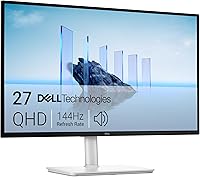
The Dell S2725DSM is a 27 inch QHD monitor with 2560 by 1440 resolution, a 144Hz refresh rate, built-in speakers, and height, tilt, pivot, and swivel adjustments. It suits a reader who wants sharper detail and more flexible positioning.
Choose QHD if you regularly work with dense spreadsheets, small fonts, or multiple windows. If your tasks are simple and you want to spend less, 1080p may be enough.
Would 4K be too much for a 27 inch monitor?
4K is useful on a 27 inch monitor if you want very fine detail and your computer can drive it well. Small interface elements may need scaling, so more pixels don't always mean more usable space.
The Dell S2725QS is a 27 inch 4K monitor with 3840 by 2160 resolution, an IPS panel, and height, tilt, pivot, and swivel adjustments. It also supports refresh rates up to 120Hz and includes built-in speakers.
Choose 4K for detailed work or if you value crisp text, and check your computer's video output and scaling options first. For a simpler office setup, 1440p may offer a more balanced step up from 1080p.
Does viewing distance change how sharp 1080p looks?
Yes, viewing distance affects how visible the pixels and softer edges are. Sitting farther away can make 1080p look smoother, while sitting close makes fine detail easier to inspect.
Set the monitor so you can read comfortably without leaning in. If you routinely bring your face close to the screen to read, a higher resolution or a smaller monitor may suit you better.
How should you choose between 1080p and 1440p?
Pick 1080p for basic tasks and value, and pick 1440p if sharper text and detail matter during your workday. Consider 4K when fine detail is a priority and your computer can handle it.
Your choice also depends on your desk, eyesight, and computer. A 24 inch 1080p monitor can look sharper than a 27 inch 1080p one, while a 27 inch 1440p screen offers both more area and more detail.
For more size guidance, compare 27 vs 32 inch monitors for office work. If you want a smaller screen, our guide to the best 24 inch monitors for home office desks can help you narrow that choice.
Is 1080p good for a 27 inch monitor for your setup?
For a 27 inch monitor, choose 1080p if everyday tasks and a bigger screen matter more than fine detail. Choose 1440p if you want clearer small text and extra workspace, or 4K if you want the finest detail and your computer supports it.
If you're still unsure, compare the screen at your usual desk distance and use the same text size you rely on at work. Start with our monitor size and sharpness guide for related screen-size advice.
Frequently asked questions
Is 1080p too low for a 27 inch monitor?
No, 1080p isn't automatically too low for a 27 inch monitor. It can work well for basic office tasks, browsing, and video, especially if you sit a little farther away.
Text and fine details look less crisp than on a 1440p or 4K screen, so consider a higher resolution if sharpness matters to you.
Is 1440p better than 1080p on a 27 inch monitor?
1440p gives a 27 inch screen more pixels than 1080p, so small text and fine details can look sharper. It can also give you more room for windows and documents.
Whether that difference is worth it depends on your work, budget, computer, and viewing distance.
Can I use a 27 inch 1080p monitor for office work?
Yes, a 27 inch 1080p monitor can handle email, documents, video calls, and general browsing. If you read small text or compare detailed spreadsheets all day, you may prefer the added sharpness of 1440p.
Try adjusting text size and sitting at a comfortable distance before deciding.
What resolution should I choose for a 27 inch monitor?
Choose 1080p if you want a lower-cost screen for everyday tasks and don't mind less crisp detail. Choose 1440p for a sharper balance of detail and workspace, or 4K if you want still finer detail and your computer can drive it comfortably.
Check your eyesight, apps, and desk distance too.