Best 24 Inch Monitors for Home Office Desks: Top 9 Picks (October 2026)
The best 24 inch monitors for home office desks include the Dell S2425HSM for flexible desk positioning, the LG 24U411A-B for a slim multi-monitor setup, and the Dell SE2426H for wide viewing angles.
On this page (3 sections)
The Dell S2425HSM is the best 24 inch monitor for most home offices because its stand adjusts for height, tilt, pivot and swivel, and it includes built-in speakers. For a simpler screen, the LG 24U411A-B has slim bezels, while the BenQ GW2490C offers USB-C video and data.
A 24 inch class monitor is a sensible fit for many desks, especially when your main work is documents, email, browser tabs and calls. Most picks here use a 23.8 inch Full HD screen, so the main differences are stand movement, panel type and connection options.
If you're still deciding on screen size, start with our plain guide to choosing a home office monitor. The 1080p on a 27 inch monitor guide explains what changes when you move up in size.
Our picks at a glance
-
1

-
2

-
3

Which 24 inch monitor works best for a home office?
The Dell S2425HSM is the most flexible pick here, while the LG and Dell SE2426H suit desks where a clean screen layout or wider viewing angle matters. The right choice depends on how you position the screen and what you need to connect.
Dell S2425HSM: Best for flexible desk positioning
- 23.8-inch FHD
- 144Hz refresh rate
- Height, tilt, pivot and swivel adjustment
- Two built-in 3W speakers
Its adjustable stand can suit a desk where the screen needs to move between tasks or users. Built-in speakers also reduce the need for separate desktop audio.
Pros
- Stand adjusts in four ways
- Two built-in speakers
- 144Hz refresh rate
Cons
- HDMI connectivity
- Full HD resolution
The Dell S2425HSM stands out for its four-way stand adjustment. Height, tilt, pivot and swivel give you more ways to line up the screen with your chair, desk and viewing position.
Its 23.8 inch Full HD screen has a 144Hz refresh rate, and the monitor includes two 3W speakers. HDMI is the listed connection, so check that your computer has a compatible output.
The TÜV 4-star certification and blue-light reduction are listed as eye-comfort features. They are useful details to consider for a desk where you spend long stretches reading or switching between windows.
Buy it if your screen position needs to change during the day or you want speakers built into the display. If you need USB-C for a laptop, consider the BenQ below.
LG 24U411A-B: Best for a slim multi-monitor setup
- 23.8-inch FHD IPS
- 120Hz refresh rate
- Three-side virtually borderless design
- Tilt adjustment
The slim bezels and modest base suit a dual-screen desk where a visually continuous layout matters. Reader Mode and Flicker Safe are included for document work.
Pros
- Three-side virtually borderless design
- IPS panel
- Reader Mode and Flicker Safe
Cons
- Stand adjusts by tilt
- HDMI connectivity
The LG 24U411A-B is a good fit for a dual-monitor layout where slim borders help the screens sit side by side. Its three-side virtually borderless design keeps the frame visually light.
The IPS panel has a 120Hz refresh rate, Full HD resolution and HDR10 support. Reader Mode lowers blue light levels, while Flicker Safe is another feature for long document sessions.
This monitor's stand adjusts by tilt, and its listed connection is HDMI. LG's Switch app can split the display into as many as 6 sections, with software installation required.
Choose the LG for a tidy multi-screen desk with a few extra screen layout options. See our guide to setting up dual monitors with a laptop if you're adding a second screen.
Dell SE2426H: Best for wide viewing angles
- 23.8-inch FHD IPS
- 144Hz refresh rate
- 178° viewing angles
- Two HDMI connections
The IPS panel is a practical choice when you view the screen from off-center or want consistent color across its width. Two HDMI connections can accommodate more than one source.
Pros
- IPS panel with 178° viewing angles
- Two HDMI connections
- 144Hz refresh rate
Cons
- Stand adjusts by tilt
- No height adjustment
The Dell SE2426H is a strong option if you often look at the display from an angle. Dell lists a 178° by 178° viewing angle and an IPS panel for consistent color across a wide view.
It also has a 144Hz refresh rate, thin bezels and two HDMI connections. The stand adjusts by tilt, so it offers less positioning range than the S2425HSM.
Pick this Dell if your desk needs two HDMI inputs or you want an IPS panel with wide viewing angles. Its eye-comfort certification is TÜV Rheinland 3-star.
BenQ GW2490C: Best for a USB-C laptop connection
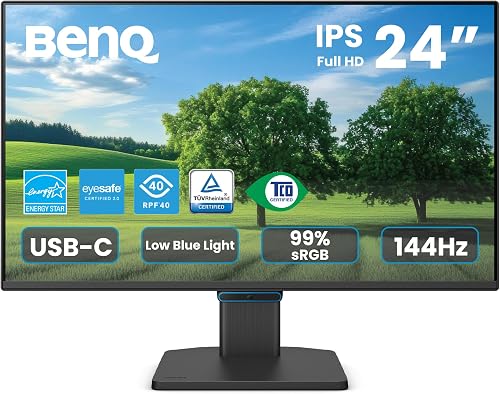
- 23.8-inch FHD IPS
- USB-C connection
- 144Hz refresh rate
- Flicker-Free and Low Blue Light
USB-C can carry video and data over one cable, which may reduce desk clutter with a compatible laptop. The IPS screen and eye-care features suit long sessions.
Pros
- USB-C video and data connection
- IPS panel
- Flicker-Free and Low Blue Light
Cons
- Stand adjusts by tilt
- Confirm that your laptop supports video over USB-C
The BenQ GW2490C is the choice here for a laptop desk that can use USB-C video and data over one cable. That may reduce cable clutter, but confirm your computer supports video output through its USB-C port.
Its 23.8 inch IPS display has Full HD resolution and a 144Hz refresh rate. BenQ also includes Flicker-Free and Low Blue Light features, plus Eye-CareU software for on-screen control and reminders.
The stand tilts, and the screen has an ultra-slim bezel. Check the exact cable and connection requirements for your laptop before choosing this model.
Choose BenQ when USB-C is a deciding feature and your laptop supports the needed video connection. For more on a monitor's ability to power a laptop, see whether a monitor can charge a laptop.
Lenovo L24-4e: Best for HDMI and VGA devices

- 23.8-inch FHD IPS
- 100Hz refresh rate
- HDMI and VGA connections
- VESA mount support
HDMI and VGA give this model a useful mix for newer computers and older equipment. Its tilt stand is simple, and VESA support gives you another mounting option.
Pros
- HDMI and VGA connections
- IPS panel
- VESA mount support
Cons
- Stand adjusts by tilt
- No height adjustment
The Lenovo L24-4e works well when you need to connect both newer and older equipment. HDMI and VGA are included, and the IPS display gives you wide viewing angles.
Its 23.8 inch screen is Full HD with a 100Hz refresh rate. The tilt stand supports basic angle changes, while VESA mount support gives you the option to use a compatible arm or bracket.
Flicker-free technology and 99% sRGB coverage round out the listed features. Those details make it a practical office screen, though it does not offer height adjustment on its supplied stand.
Choose the Lenovo if HDMI and VGA both matter or you plan to mount the screen. Measure your desk or arm setup before deciding where it will sit.
Philips 241V8LB: Best for high contrast

- 23.8-inch FHD VA
- 100Hz refresh rate
- 3000:1 contrast ratio
- EasyRead mode
The VA panel's stated 3000:1 contrast ratio suits buyers who value deeper blacks for mixed work and video. EasyRead mode is aimed at lengthy documents.
Pros
- 3000:1 contrast ratio
- HDMI and VGA
- EasyRead mode
Cons
- VA panel rather than IPS
- VESA mounting option instead of listed stand adjustments
The Philips 241V8LB suits buyers who put contrast and document reading high on their list. Its VA panel has a stated 3000:1 contrast ratio, and EasyRead mode is designed for lengthy text.
The 23.8 inch Full HD display refreshes at 100Hz and has a 178° by 178° viewing angle. HDMI and VGA are listed connections, and the screen has a three-side virtually bezel-free design for multi-monitor arrangements.
Philips lists flicker-free technology and a blue light filter. It supports VESA mounting, which is useful if you prefer a separate monitor arm.
Pick the Philips for its high stated contrast ratio and EasyRead mode. If you mainly want side-by-side windows for spreadsheets, our monitor guide for spreadsheets covers wider screen options too.
ViewSonic VA2448-MH: Best for switching between work modes

- 24-inch FHD IPS
- 120Hz refresh rate
- HDMI and VGA connections
- Text, Web, Movie, Game and Mono ViewModes
ViewMode presets let you switch the screen's settings for text, web, movies, games or monochrome viewing. HDMI and VGA cover a range of computers.
Pros
- Five ViewMode presets
- IPS panel
- HDMI and VGA
Cons
- Stand adjusts by tilt
- No height adjustment
The ViewSonic VA2448-MH offers several picture presets for different types of work and downtime. ViewMode includes Text, Web, Movie, Game and Mono modes.
Its IPS panel is Full HD and supports a 120Hz refresh rate. HDMI and VGA connections add flexibility for desktops, laptops and older computers, while Flicker-Free and a blue light filter are included.
The stand tilts, and the frameless design can help keep a pair of screens visually close together. It does not have listed height adjustment, so check whether the desk and chair put the screen at a suitable level.
Choose ViewSonic if you expect to switch among text, web and media modes. Its feature mix is broader than the basic office essentials, without adding stand movement beyond tilt.
Acer KB242Y: Best for a simple IPS screen

- 23.8-inch FHD IPS
- Up to 120Hz refresh rate
- HDMI and VGA connections
- Tilt adjustment
This straightforward IPS monitor has HDMI and VGA for different computers, plus a tilt stand for basic positioning. Its zero-frame design keeps the visible borders slim.
Pros
- IPS panel
- HDMI and VGA
- Up to 120Hz refresh rate
Cons
- Stand adjusts by tilt
- No height adjustment
The Acer KB242Y is a straightforward IPS monitor with a 23.8 inch Full HD screen and up to a 120Hz refresh rate. Its zero-frame design keeps the visible borders small.
HDMI and VGA provide two common ways to connect a computer. The stand tilts, and Adaptive-Sync support is listed for smoother motion with compatible graphics hardware.
This model also has a 99% color gamut figure in its specifications. Its basic stand and connection set make it best suited to an uncomplicated desk setup.
Choose Acer for a simple IPS screen with HDMI and VGA. If height adjustment is important, compare it with the Dell S2425HSM before settling on a stand.
Samsung Essential S30GD 24: Best for basic everyday work

- 24-inch FHD IPS
- 100Hz refresh rate
- HDMI and D-Sub connections
- Blue light filter and Flicker-Free
The Samsung combines an IPS panel with everyday office connections and eye-comfort features. Its stand offers tilt adjustment for a basic change in viewing angle.
Pros
- IPS panel
- HDMI and D-Sub
- Blue light filter and Flicker-Free
Cons
- Stand adjusts by tilt
- No height adjustment
The Samsung Essential S30GD 24 covers everyday office use with an IPS panel, Full HD resolution and a 100Hz refresh rate. Its eye-comfort features include a blue light filter and Flicker-Free.
The connections are HDMI and D-Sub, and the stand adjusts by tilt. Samsung also includes settings to adjust color and image contrast for gaming, but the workday basics are the main reason to consider this model.
The Samsung does not offer height adjustment on its listed stand. If your screen needs to sit higher, plan for a compatible stand or compare a model with more built-in movement.
Choose Samsung for basic daily work and familiar connections. It is a simple fit when tilt is enough and you do not need USB-C.
How should you compare 24 inch office monitors?
Compare the stand, connection type and panel before focusing on refresh rate. Those choices shape how easily the monitor fits your desk and computer.
Is 1080p enough for a 24 inch home office monitor?
Yes, Full HD at 1920 x 1080 is a sensible resolution for a 23.8 or 24 inch work screen. It suits common office tasks without requiring you to scale every app as you might on a higher-resolution display.
If you work with dense spreadsheets or many open windows, screen area may matter more than a small jump in resolution. Our 32 inch home office monitor roundup compares larger options.
Which stand adjustments matter most?
Height adjustment is useful if you want to raise or lower the screen without adding a separate riser. Tilt changes the viewing angle, while pivot rotates the display between landscape and portrait.
The Dell S2425HSM is the only pick in this roundup with height, tilt, pivot and swivel listed together. Most of the other models tilt, so match the stand's range to your posture and desk height.
Should you choose IPS or VA?
IPS is a practical default for a shared desk or a screen that you view from off-center. Most picks here use IPS panels, and Dell's SE2426H specifically lists a 178° viewing angle.
The Philips 241V8LB uses a VA panel with a stated 3000:1 contrast ratio. Consider it if stronger contrast is a priority, and compare the panel type with the way you use the screen.
Which monitor connection should you check first?
Match the monitor connection to your computer before buying. HDMI is common across these models, while the BenQ GW2490C offers USB-C and the Lenovo, Philips, ViewSonic and Acer add VGA.
USB-C does not always mean a laptop can send video through that port. Check your computer's port capabilities, and use our USB-C vs HDMI monitor guide if you need to compare connection options.
Which 24 inch monitor should you choose?
Choose the Dell S2425HSM if adjustable positioning and built-in speakers matter most. Choose the BenQ GW2490C for a compatible USB-C laptop, or the Lenovo L24-4e when you need both HDMI and VGA.
For a slim multi-monitor setup, choose the LG 24U411A-B. If you are still weighing screen sizes, compare this roundup with our home office monitor guide.
Our score weighs specs, features and buyer feedback against what you're shopping for.
Our top 3 picks at a glance
-
1
-
2
-
3
Frequently asked questions
Is a 24 inch monitor large enough for home office work?
Yes, a 24 inch class screen is large enough for common tasks such as email, documents and video calls. Most of these picks have a 23.8 inch screen with Full HD resolution.
If you regularly keep several full-size windows open, compare a larger screen or a second display with your desk space.
Is Full HD good enough on a 24 inch monitor?
Full HD at 1920 x 1080 is a common match for a 23.8 or 24 inch office monitor. It gives you a clear view of documents, web pages and video calls at this screen size.
For more detail or room for a larger workspace, see our guide to 1080p on a 27 inch monitor.
Should you choose an IPS or VA panel for office work?
An IPS panel is a good choice if you view the monitor from off-center or want consistent color across the screen. A VA panel can appeal if contrast is a higher priority, as with the Philips 241V8LB and its stated 3000:1 contrast ratio.
Choose based on your usual viewing position and work.
Do you need a height-adjustable monitor stand?
Height adjustment helps position the screen at a comfortable level without raising the base on books or buying a separate stand. The Dell S2425HSM offers height adjustment along with tilt, pivot and swivel.
Most other picks here adjust by tilt, so check whether that range suits your desk.
Can a 24 inch monitor connect to a laptop with USB-C?
Some can. The BenQ GW2490C has USB-C for video and data, but your laptop's USB-C port must support video output for the connection to work as intended.
For a broader connection comparison, read USB-C vs HDMI for a monitor.