Is 1440p Worth It Over 1080p for Office Work?
1440p is worth it over 1080p if you want more workspace and sharper detail on a similar-size screen. For basic office tasks or a smaller monitor, 1080p can be enough.
On this page (7 sections)
- Is 1440p worth it over 1080p for office work?
- What changes when you move from 1080p to 1440p?
- When is 1080p enough for office work?
- Does 1440p make office text sharper?
- Should you choose 1440p for spreadsheets and multitasking?
- Does your computer need anything special for 1440p?
- Is 1440p worth it over 1080p for your desk?
1440p is worth it over 1080p for office work if you want more room for windows and sharper detail on a similar-size screen. A 1080p monitor can still suit basic tasks, especially on a smaller display.
The choice comes down to screen size, how you arrange your work, and whether small text stays comfortable to read. For many home offices, 1440p makes the most sense on a 27-inch monitor.
Is 1440p worth it over 1080p for office work?
Yes, 1440p is often worth it if your work benefits from extra workspace or clearer fine detail. It displays 2560 x 1440 pixels, compared with 1920 x 1080 for Full HD, so it has more pixels to show documents, menus, and windows.
That doesn't mean every task needs 1440p. If you mostly use one window at a time, a smaller screen, or large text, 1080p may already feel clear and practical.
A 27-inch 1440p monitor is a common match for office use because it combines a larger work area with more detail than 1080p at the same size. For more on that screen size, see whether 1080p is good enough on a 27-inch monitor.
What changes when you move from 1080p to 1440p?
You get more pixels to work with at 1440p, which can make a screen feel roomier and text edges look finer. The difference is easiest to notice when you use several windows or work with detailed tables and diagrams.
You may be able to keep a document beside a browser without each window feeling as cramped. More pixels do not automatically make every word larger, though.
If text looks too small, adjust display scaling or app zoom.
The physical screen still matters. A 1440p resolution on a compact display can make interface elements feel small, while the same resolution on a larger screen gives you more room to arrange content.
Is 1440p worth it over 1080p on a 27-inch monitor?
For many people, 1440p is a stronger fit than 1080p on a 27-inch monitor. It puts more pixels across a screen large enough for the added workspace to be useful.
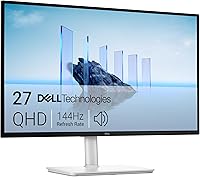
The Dell S2725DSM has a 27-inch QHD display with 2560 x 1440 resolution. Its stand adjusts for height, tilt, pivot, and swivel, which can help you position the screen for your desk.
If you're comparing models for a work desk, our guide to the best 1440p monitors for work covers more options.
When is 1080p enough for office work?
1080p is enough when the screen is modest in size, your work is straightforward, and you don't need much side-by-side space. It can also be a reasonable choice if larger text matters more to you than fitting extra content onscreen.
A 23.8-inch display with 1920 x 1080 resolution offers a familiar Full HD layout. The Dell S2425HSM is one example, with a height-adjustable stand that also tilts, pivots, and swivels.
Choose 1080p if you mainly work in one app at a time or want to keep text comfortably sized without scaling. Compare 27-inch and 32-inch monitors for office work if you're still deciding how much screen area your desk can handle.
Does 1440p make office text sharper?
1440p can make text and fine details look sharper than 1080p on a screen of the same size. It has more pixels packed into that area, though your viewing distance and display settings also shape what you see.
Start with your operating system's recommended resolution and scaling. Then adjust the text size in your apps if menus or documents feel too small.
If eye comfort is a concern, consider more than resolution. Glare, brightness, font size, viewing distance, and how you position the screen all affect a long work session.
The Samsung ViewFinity S6 (S61F) is a 27-inch QHD monitor with a 2560 x 1440 display, plus height and pivot adjustment. Samsung also describes an eye comfort mode and a TÜV certification for eye comfort.
Should you choose 1440p for spreadsheets and multitasking?
Choose 1440p if you regularly compare columns, keep reference material open, or place two windows side by side. The extra resolution can make that layout more practical without relying on a second monitor.
A screen's resolution doesn't replace a good layout. Larger spreadsheets may still benefit from a wider monitor or two screens, depending on your desk and workflow.
For detailed color work, a panel with relevant color features may matter more than resolution alone.
The ASUS ProArt PA278QV is a 27-inch 1440p monitor with a 2560 x 1440 IPS display. ASUS states that it covers 100% of the sRGB and Rec.
709 color gamuts, and its stand supports tilt, pivot, swivel, and height adjustments.
If you spend much of the day in worksheets, see our guide to the best monitors for spreadsheets and Excel.
Does your computer need anything special for 1440p?
Your computer needs to support the monitor's resolution through a compatible video connection. Check its specifications and available ports before you buy, especially if you use a laptop or docking station.
The monitors in this guide list HDMI and DisplayPort connections, though the specific ports vary by model. Your computer, cable, and any dock also affect which resolution and refresh rate you can use.
For a laptop setup, confirm that the monitor connection works with your computer's output. Our guide to USB-C versus HDMI for a monitor explains the differences between those connection types.
Is 1440p worth it over 1080p for your desk?
Pick 1440p if you want more workspace and fine detail on a 27-inch screen; pick 1080p if a smaller display and simpler tasks suit you better. Think about your usual window layout, text size, desk depth, and computer connections.
If you want a 27-inch QHD display with an adjustable stand, consider the Dell S2725DSM or Samsung ViewFinity S6 (S61F). For color-focused work, the ASUS ProArt PA278QV has stated sRGB and Rec.
709 coverage. If you want a smaller Full HD screen, consider the Dell S2425HSM.
For another resolution comparison, read 4K versus 1440p monitors for work.
Frequently asked questions
Is 1440p worth it over 1080p for office work?
Often, yes, if you use a 27-inch monitor and want more room for documents, spreadsheets, and side-by-side windows. A 1080p display can be a sensible choice for a smaller screen or basic tasks.
The best fit depends on your viewing distance, eyesight, apps, and computer.
Is 1440p better than 1080p for reading text?
On a similar-size screen, 1440p packs more pixels into the same area, which can make text and fine details look sharper. The result also depends on scaling, font size, viewing distance, and your eyesight.
Adjust text size if a higher resolution makes interface elements feel too small.
Is 1440p too much for a 24-inch monitor?
1440p can show fine detail on a 24-inch monitor, but many office users may prefer the larger text and familiar layout of 1080p at that size. Consider how close you sit and whether you want extra workspace.
Screen scaling can make text easier to read.
Does 1440p make a computer slower?
1440p asks a computer to display more pixels than 1080p, so the effect depends on its graphics hardware, apps, and workload. Everyday office tasks are different from demanding games or video work.
Check your computer's supported display resolutions and ports before choosing a monitor.