Dell S2725QC vs P2725QE: Which Monitor to Buy? (November 2026)
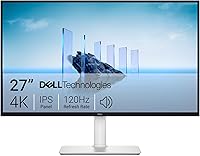
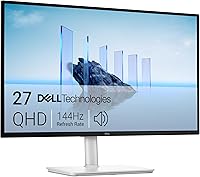
The Dell P2725QE is the better monitor for most work setups, while the S2725QC is the better pick for smoother motion. In this Dell S2725QC vs P2725QE comparison, the P2725QE wins on ports and stand features, and the S2725QC wins on refresh rate.
On this page (6 sections)
The Dell P2725QE is the better monitor for most work setups, while the S2725QC is the better pick for smoother motion. In this Dell S2725QC vs P2725QE comparison, the P2725QE's 9.2 score edges the S2725QC's 8.7 on connectivity and stand flexibility, but the S2725QC's faster panel wins for readers who care about refresh rate.
Both are 27-inch 4K IPS monitors with a 1500:1 contrast ratio and 350 cd/m² brightness. The real split is in ports, stand features and refresh rate, not in resolution or panel type.
Read on for the specs side by side, the points that decide the choice, and who should buy each one.


Dell S2725QC vs P2725QE at a glance
The P2725QE is the overall winner for office desks, and the S2725QC is the faster, friendlier option for mixed use. Here is how the two 27-inch 4K panels line up.
| Product | Best for | Size and resolution | Refresh rate | Response time | Our score |
|---|---|---|---|---|---|
| Dell P2725QE 68.6 cm | docking and daily desk work | 27 in, 3840 x 2160 | 100Hz | 5ms | 9.2 |
| Dell S2725QC | smooth scrolling and mixed work | 27 in, 3840 x 2160 | Up to 120Hz | 4ms | 8.7 |
Both screens share the same core: a 27-inch IPS panel at 3840 x 2160, a 1500:1 contrast ratio, 350 cd/m² brightness and 99% color coverage. Neither one asks you to give up sharpness or a matte finish.
The differences start with refresh rate. The S2725QC runs up to 120Hz with AMD FreeSync Premium and a 4ms response time.
The P2725QE runs at 100Hz with a 5ms response time and G-Sync Compatibility listed in its specs.
Ports split the two as well. The P2725QE lists 1 x DP, 1 x HDMI and 1 x USB-C, plus RJ45 Ethernet and a USB hub.
The S2725QC lists HDMI and USB connectivity, with a single USB-C cable carrying up to 65W of power delivery.
Which monitor has the better port setup?
The P2725QE wins on ports for a fixed desk setup. Its DisplayPort, HDMI and USB-C inputs cover more ways to connect, and the RJ45 Ethernet port handles a wired network without a separate adapter.
That matters if you want one screen to act as the center of your desk. The USB hub lets you keep peripherals plugged into the monitor, and the Ethernet port means a stable connection for calls and file transfers.
The S2725QC takes a simpler approach. It lists HDMI and USB connectivity, and its headline feature is a single USB-C cable with up to 65W power delivery.
That's a tidy setup for a laptop, since one cable handles video and charging.
For a desktop tower with a separate network cable already in place, the P2725QE's extra ports are more useful. For a laptop that moves between rooms, the S2725QC's single-cable hookup is the easier habit.
USB-C power and hub differences
The S2725QC's USB-C port delivers up to 65W. That's enough to keep most laptops topped up while the monitor drives the display.
The P2725QE's USB-C port and USB hub are listed without a power figure in the specs we have. If charging your laptop from the monitor is a priority, the S2725QC states its wattage plainly.
The P2725QE's edge is breadth rather than charging. A DisplayPort input, HDMI, USB-C and RJ45 Ethernet in one screen covers more desk setups without a dock.
Wired network and docking
If your office runs on wired Ethernet, the P2725QE's RJ45 port is the practical choice. It saves you from buying a separate USB network adapter and reduces cable clutter.
The S2725QC doesn't list an Ethernet port. A USB-C dock or adapter would be needed for a wired connection, which adds a box and more cables to the desk.
Neither monitor is a full docking station. Check what your laptop needs before you decide whether the P2725QE's hub is enough on its own.
Which panel is better for daily work?
Both panels are strong for office work, and the S2725QC's faster refresh gives it the edge for motion. For documents, spreadsheets and video calls, either screen holds up.
The shared foundation is the same. A 27-inch 4K IPS panel gives you sharp text and wide viewing angles, and the matte finish keeps glare down in a bright room.
Brightness sits at 350 cd/m² on both. That's a sensible level for a home office or a well-lit open-plan desk, though a room with direct sun may want more.
The 1500:1 contrast ratio is also shared. Text and dark backgrounds separate cleanly on both panels, so reading long documents won't feel washed out.
Refresh rate and motion
The S2725QC runs up to 120Hz. That makes scrolling, dragging windows and watching video noticeably smoother than a 60Hz panel, and its AMD FreeSync Premium helps prevent tearing.
The P2725QE runs at 100Hz. That's still faster than the 60Hz standard, so everyday movement feels fluid, but it doesn't reach the S2725QC's ceiling.
If you spend the day reading and typing, the gap won't bother you. If you scroll long pages, move windows between apps or watch a lot of video, the S2725QC's 120Hz is the more comfortable experience.
Response time and adaptive sync
The S2725QC lists a 4ms response time and AMD FreeSync Premium. The P2725QE lists 5ms and G-Sync Compatibility.
Both are work-grade figures, not esports specs.
FreeSync Premium and G-Sync Compatibility each reduce tearing when the refresh rate and frame rate move together. Which one matters depends on your graphics card and what you run.
Color and brightness
Both panels list 99% color coverage and 350 cd/m² brightness. The P2725QE's spec sheet gives the color figure as 99 and the contrast as 1500:1, matching the S2725QC's stated 99% sRGB and 1500:1.
For photo editing or design work at a desk, either screen covers the sRGB space well. For color-critical print work, neither one claims a wide-gamut space, so don't expect Adobe RGB coverage from these two.
Which stand and mount fit your desk?
The P2725QE gives you more positioning choices on its own stand and a standard VESA mount. That matters if you share a desk or sit at different heights through the day.
Its stand tilts and pivots. Pivot lets you turn the screen into portrait mode for long documents, code or a second reading column.
The S2725QC's stand adjustment is broader on paper. Its features list includes height, pivot, swivel and tilt adjustment, so you can raise it to eye level and angle it toward you.
One detail to watch: the S2725QC's mounting type is listed as desk mount, while the P2725QE lists VESA 100 x 100 mm. If you plan to put the screen on an arm or a wall bracket, the P2725QE's standard VESA pattern is the safer starting point.
Desk space and cable routing
A 27-inch screen takes up real desk room. The P2725QE measures 32.28 inches deep, 17.72 inches wide and 5.91 inches high in its listed dimensions, and weighs 4620 g.
The S2725QC's listed dimensions are 7.89 inches deep, 24.08 inches wide and 15.3 inches high, at 14.8 pounds. If desk depth is tight, compare those depth figures against your own desk before ordering.
Portrait mode and shared desks
Portrait mode is the practical feature for readers who work through long pages. The P2725QE's pivot adjustment supports it, and the S2725QC's stand lists pivot as well.
For a shared desk, height and swivel adjustment matter more. The S2725QC lists both, while the P2725QE's tilt and pivot cover the basics without a stated height range.
Which monitor suits your workspace?
Pick the P2725QE for a fixed desk with a wired network and multiple devices; pick the S2725QC for a laptop-first setup or smoother motion. The score gap reflects that the P2725QE covers more work setups out of the box.
The P2725QE suits an office where the monitor stays put. Its DisplayPort, HDMI, USB-C and Ethernet ports let you connect a desktop, a laptop and a network cable without extra hardware.
The S2725QC suits a home desk built around one laptop. Its single USB-C cable with up to 65W power delivery means fewer cables, and its 120Hz panel is nicer for scrolling and video.
If you're still deciding between brands, our Dell vs Samsung monitor comparison covers how the two makers differ for work. And if you're weighing whether Dell is the right brand at all, our guide on whether Dell monitors are good for a home office walks through what to expect.
Buy the P2725QE if…
The P2725QE is the better fit when your desk has a wired network, more than one device and a fixed seating position. Its USB hub and Ethernet port turn the screen into the hub of the desk.
It's also the pick when you want a standard VESA mount for an arm or wall bracket. The 100 x 100 mm pattern is the common standard, so arms and brackets are easy to match.
Choose it when 100Hz is fast enough for your daily work. That covers documents, calls and casual video without the faster panel of the S2725QC.
Buy the S2725QC if…
The S2725QC is the better fit for a laptop-first desk. One USB-C cable carries video and up to 65W of charging, so you can sit down and connect with a single plug.
It's also the pick for smoother motion. The 120Hz refresh rate and AMD FreeSync Premium make scrolling and video feel more fluid than the P2725QE's 100Hz.
Built-in speakers are another reason to choose it. They save desk space compared with separate speakers, and the sound is described as re-engineered for more detail than the previous generation.
If you want to see how the S2725QC stacks up against another Dell 4K model, our Dell S2725QC vs Dell U2725QE comparison looks at the step up in that range. Readers comparing the S2725 family more broadly can also read our Dell S2725DSM vs S2725QS breakdown for the differences within that line.
Which one should you buy?
Buy the Dell P2725QE for most work desks, and buy the S2725QC if a faster panel or laptop charging matters more. The P2725QE's 9.2 score reflects its broader port set and stand flexibility.
The P2725QE wins the Dell S2725QC vs P2725QE decision for a fixed office setup. Its USB-C hub, DisplayPort, HDMI and RJ45 Ethernet cover more devices and a wired network in one screen, and its tilt, pivot and VESA 100 x 100 mm mount make positioning easy.
The S2725QC is the better buy when smooth motion is the priority. Its 120Hz refresh rate, AMD FreeSync Premium and 4ms response time beat the P2725QE's 100Hz and 5ms, and its single USB-C cable with up to 65W power delivery keeps a laptop desk tidy.
Neither monitor is a poor choice. Pick the P2725QE if you want a desk hub with more ports and a standard mount; pick the S2725QC if you want the faster panel and simpler laptop hookup.
Either way, a 27-inch 4K IPS screen gives you sharp text and wide viewing angles for the workday.
Our score weighs specs, features and buyer feedback against what you're shopping for. That's why the P2725QE leads here: it covers more of the setups most readers bring to a 27-inch 4K monitor.
Frequently asked questions
Is the Dell P2725QE better than the S2725QC for office work?
Yes, for most desk setups. The P2725QE adds DisplayPort and RJ45 Ethernet to its USB-C hub, so it can act as a docking station, and its stand tilts and pivots on a standard VESA mount.
Does the Dell S2725QC have better refresh rate than the P2725QE?
Yes. The S2725QC runs at up to 120Hz with AMD FreeSync Premium and a 4ms response time, while the P2725QE runs at 100Hz with a 5ms response time.
That gap matters for scrolling and video more than for spreadsheets.
Which monitor is better for Mac users?
The S2725QC is the easier fit for a Mac laptop, because a single USB-C cable carries video and up to 65W of power delivery. The P2725QE's USB-C port is also there, and its RJ45 Ethernet gives you a wired network option.
Do both Dell monitors have a VESA mount?
The P2725QE lists VESA 100 x 100 mm mounting in its specs. The S2725QC's stand adjustment and mounting type differ, so confirm its VESA pattern before you plan an arm or wall mount.
Which Dell monitor is better for gaming?
The S2725QC, thanks to its 120Hz refresh rate, AMD FreeSync Premium and 4ms response time. The P2725QE is a work-first 4K panel at 100Hz with G-Sync Compatibility listed, which is fine for casual play but not the faster option here.