8 Best Curved Monitors for a Home Office (October 2026)
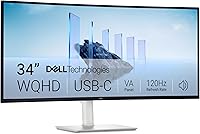
The best curved monitors for a home office include the Dell S3425DW for a laptop and wide workspace, the Samsung ViewFinity S50GC 34 for two sources on one screen, and the Samsung Essential S3 27 Curved (S36GD) for a compact Full HD setup.
On this page (7 sections)
- How we chose curved monitors for a home office
- The best curved monitors for different home offices
- Which curved monitor size fits your desk?
- Is an ultrawide curved monitor better for multitasking?
- What resolution should you choose for office work?
- Do you need USB-C on a curved monitor?
- Which curved monitor should you choose?
The Dell S3425DW is the best curved monitor for most home offices, with a 34-inch ultrawide WQHD screen, USB-C power delivery up to 65W and height adjustment. If you want two video sources on one screen, the Samsung ViewFinity S50GC 34 adds picture-by-picture and picture-in-picture modes.
A curved screen can make the edges feel closer to you, but its shape doesn't guarantee a better fit for every desk or task. Think about how much width you have, what resolution you want and whether you need USB-C before choosing a model.
For a broader starting point, see our plain guide to home office monitors. If you mainly work with columns and windows, our monitor picks for spreadsheets cover screen space in more detail.
Our picks at a glance
-
1

-
2

-
3
 Best for a compact Full HD setup
Samsung Essential S3 27 Curved (S36GD)
8.0/10 our score
See it on Amazon
How we chose curved monitors for a home office
We compared screen size, resolution, connections and work features against the needs of a home office. The Dell S3425DW leads this list because it combines a wide WQHD screen with USB-C power delivery, while the other picks cover smaller desks, built-in speakers or multiple video inputs.
Our score weighs specs, features and buyer feedback against what you're shopping for. A higher score means the listed features fit more of the needs in this guide; it isn't a promise about your experience.
Curved displays here range from 24 to 34 inches. Check the width of your desk and the distance from your chair to the screen, then compare those measurements with the monitor dimensions before you buy.
| Product | Best for | Screen | Resolution | Connections | Our score |
|---|---|---|---|---|---|
| Dell S3425DW | a laptop and wide workspace | 34 in, curved, 21:9 | 3440 x 1440 | HDMI, USB-C | 8.5 |
| Samsung ViewFinity S50GC 34 | two sources on one screen | 34 in, 21:9 | 3440 x 1440 | 2 HDMI, DisplayPort | 8.2 |
| Samsung Essential S3 27 Curved (S36GD) | a compact Full HD setup | 27 in, 16:9 | 1920 x 1080 | HDMI, D-Sub | 8.0 |
| LG 32MR50C-B Curved | a large Full HD screen | 32 in, 16:9 | 1920 x 1080 | HDMI, D-Sub | 7.6 |
| Samsung Essential S3 24 Curved (S36GD) | a small desk | 24 in, 16:9 | 1920 x 1080 | HDMI, D-Sub | 7.4 |
| Samsung S3 32 Curved (S39GD) | built-in speakers | 32 in, 16:9 | 1920 x 1080 | HDMI, D-Sub, headphone | 7.3 |
| Sceptre 27 Curved | multiple legacy connections | 27 in, 16:9 | 1920 x 1080 | 2 HDMI, VGA | 7.0 |
| SANSUI 27 Curved USB-C | USB-C at 27 inches | 27 in, 16:9 | 1920 x 1080 | USB-C, HDMI | 6.9 |
The best curved monitors for different home offices
The best choice depends on whether you need a wide workspace, a smaller screen or convenient laptop connections. These picks are listed from highest score to lowest.
Dell S3425DW: Best for a laptop and wide workspace
- 34-inch curved display
- 3440 x 1440 resolution
- 21:9 aspect ratio
- USB-C power delivery up to 65W
The wide WQHD screen gives work apps room side by side, while USB-C can connect a laptop and deliver up to 65W of power.
Pros
- Ultrawide WQHD resolution
- USB-C with up to 65W power delivery
- Height and tilt adjustment
Cons
- A 34-inch screen needs a wide desk
- No DisplayPort connection is specified
The Dell S3425DW is the strongest all-around option here for a laptop-based home office. Its 34-inch, 21:9 panel has a 3440 x 1440 resolution, giving you a wider workspace than a standard 16:9 display.
USB-C handles video and can provide up to 65W of power to a connected laptop. That may let you keep a laptop's charging cable off the desk, though check your computer's power needs before relying on it.
The monitor also has HDMI, built-in speakers, height adjustment and tilt adjustment. Dell's ComfortView Plus reduces harmful blue light emissions to 35% or less, and the panel has 99% sRGB and 95% DCI-P3 coverage.
At 31.78 inches wide, it needs a broad desk. Choose it if you want one wide screen and a USB-C connection; consider the Samsung ViewFinity below if you need to show two sources at once.
Samsung ViewFinity S50GC 34: Best for two sources on one screen
- 34-inch 21:9 display
- 3440 x 1440 resolution
- Picture-by-picture and picture-in-picture
- Two HDMI and one DisplayPort input
This 34-inch ultrawide supports picture-by-picture from two sources and picture-in-picture for keeping another input in view.
Pros
- Wide WQHD workspace
- Picture-by-picture and picture-in-picture
- Ambient light sensor adjusts brightness
Cons
- No USB-C connection is specified
- Check the space available for its 32.1-inch width
The Samsung ViewFinity S50GC 34 suits people who need to keep two computers or video sources visible on one display. Picture-by-picture shows two inputs at native resolution, while picture-in-picture lets a smaller second source sit beside your main task.
Its 34-inch screen has a 3440 x 1440 resolution and a 21:9 aspect ratio. The two HDMI inputs and one DisplayPort input offer more connection options than a typical single-laptop setup, though there's no USB-C connection specified.
An ambient light sensor adjusts brightness to the workstation lighting. Eye Saver Mode and Flicker Free are also included, and the 100Hz refresh rate supports smoother motion for video and other moving content.
At 32.1 inches wide, this is also a large monitor. Pick it for a wide workspace with multi-source viewing; choose the Dell if USB-C laptop power delivery is more useful to you.
Samsung Essential S3 27 Curved (S36GD): Best for a compact Full HD setup
- 27-inch 1800R curve
- 1920 x 1080 resolution
- 100Hz refresh rate
- HDMI and D-Sub
A 27-inch screen takes less desk width than an ultrawide and pairs a curved design with Full HD resolution.
Pros
- Smaller footprint than the 34-inch picks
- 100Hz refresh rate
- TÜV-certified eye comfort features
Cons
- Full HD offers less workspace detail than WQHD
- No USB-C connection is specified
The Samsung Essential S3 27 Curved (S36GD) is a practical fit when a 34-inch ultrawide would take too much desk space. Its 27-inch Full HD screen gives you a standard 16:9 layout, and the 1800R curve is designed to bring the edges closer around your field of view.
It connects through HDMI or D-Sub and supports a refresh rate up to 100Hz. TÜV-certified eye comfort features reduce blue light and screen flicker, which may matter during long work sessions.
Full HD resolution provides less detail and workspace than the two ultrawide WQHD picks above. Consider our guide to 1080p on a 27-inch monitor if you're unsure whether that combination suits your text and window layout.
LG 32MR50C-B Curved: Best for a large Full HD screen

- 32-inch curved Full HD display
- 1920 x 1080 resolution
- 100Hz refresh rate
- Reader Mode and tilt adjustment
The 32-inch curved panel provides a larger view at Full HD resolution, with tilt adjustment and a Reader Mode.
Pros
- Large curved screen
- 100Hz refresh rate
- Tilt adjustment
Cons
- Full HD is spread across a 32-inch screen
- No USB-C connection is specified
The LG 32MR50C-B Curved gives you a large screen in a standard 16:9 shape. Its 32-inch Full HD panel suits buyers who prefer larger text and a broad view, but the resolution is less dense than on the 34-inch WQHD monitors.
Reader Mode reduces blue light, while OnScreen Control lets you split the workspace or adjust basic monitor settings with a few mouse clicks. The 100Hz refresh rate and tilt-adjustable stand add flexibility for work and casual video.
This model connects through HDMI or D-Sub. Because Full HD is spread across 32 inches, compare it with a higher-resolution display if you work with small text or need many detailed windows at once.
Samsung Essential S3 24 Curved (S36GD): Best for a small desk

- 24-inch 1800R curve
- 1920 x 1080 resolution
- 100Hz refresh rate
- HDMI and D-Sub
This 24-inch curved screen has a compact footprint and Full HD resolution, which can suit a tighter desk.
Pros
- Narrower than the other curved picks
- 100Hz refresh rate
- TÜV-certified eye comfort features
Cons
- Less screen area for multiple windows
- No USB-C connection is specified
The Samsung Essential S3 24 Curved (S36GD) is the smallest option in this roundup. Its 24-inch screen and Full HD resolution suit a limited desk or a setup where the monitor shares space with other equipment.
Like the 27-inch S36GD, it has an 1800R curve, HDMI and D-Sub connections, and a refresh rate up to 100Hz. TÜV-certified eye comfort features reduce blue light and flicker.
The trade-off is less room for side-by-side windows than on the larger screens. Choose it for a compact curved display, and look at the 27-inch version if your desk can spare the extra width.
Samsung S3 32 Curved (S39GD): Best for built-in speakers

- 32-inch curved Full HD display
- 1920 x 1080 resolution
- 100Hz refresh rate
- Built-in speakers
The 32-inch Full HD screen includes built-in speakers, so you can keep separate desktop speakers off the desk.
Pros
- Built-in speakers
- 100Hz refresh rate
- TÜV-certified eye comfort features
Cons
- Full HD is spread across a 32-inch screen
- No USB-C connection is specified
The Samsung S3 32 Curved (S39GD) is a large Full HD pick with built-in speakers. The speakers can save desk space and reduce extra connections if you don't need a separate audio setup for calls or everyday listening.
Its 32-inch screen has a 1920 x 1080 resolution and 100Hz refresh rate. Eye comfort features are TÜV certified, and the monitor connects by HDMI or D-Sub.
The large screen and Full HD resolution are worth weighing together. If you use small text or keep several detailed windows open, a 32-inch higher-resolution model may be a better match.
Sceptre 27 Curved: Best for multiple legacy connections

- 27-inch curved Full HD display
- Two HDMI and one VGA input
- Built-in speakers
- Tilt adjustment
Two HDMI inputs and VGA give this 27-inch Full HD monitor room for several connected devices, while built-in speakers reduce desk clutter.
Pros
- Two HDMI inputs plus VGA
- Built-in speakers
- Tilt adjustment
Cons
- No USB-C connection is specified
- Full HD resolution
The Sceptre 27 Curved suits a desk with several devices that use different video connections. It offers two HDMI inputs and one VGA input, plus built-in speakers and a tilt-adjustable screen.
The 27-inch panel has Full HD resolution and a 1500R curve. Sceptre also lists 99% sRGB color coverage and a refresh rate up to 100Hz.
VGA can be useful for an older computer, while the two HDMI inputs keep another device connected without swapping cables. Choose this model if those ports solve a real setup need; it doesn't include USB-C.
SANSUI 27 Curved USB-C: Best for USB-C at 27 inches

- 27-inch curved Full HD display
- 1920 x 1080 resolution
- USB-C and HDMI
- Built-in speakers
This 27-inch Full HD curved monitor includes USB-C connectivity and built-in speakers in a smaller screen size.
Pros
- USB-C connection
- Built-in speakers
- Tilt adjustment
Cons
- No USB-C power delivery amount is specified
- Full HD resolution
The SANSUI 27 Curved USB-C is the smaller curved pick to consider if you want a USB-C connection. Its 27-inch Full HD screen also includes HDMI, built-in speakers and tilt adjustment.
The listed USB-C connection doesn't specify power delivery, so don't assume it will charge a laptop. Check your computer's charging needs and confirm the connection supports the features you expect.
The 120Hz refresh rate and adaptive sync support are additional features for smoother motion. Choose it for its connection mix and size after confirming that USB-C's role in your setup is clear.
Which curved monitor size fits your desk?
A 24 or 27-inch curved monitor is easier to fit on a compact desk, while a 32-inch or 34-inch model needs more room. Measure desk width and depth before picking a screen size, especially for the two 34-inch monitors, which are over 32 inches wide.
A 24-inch Full HD display is the compact option here. A 27-inch Full HD screen gives you more physical viewing area, while 32-inch Full HD models make the same resolution cover a larger panel.
The 34-inch Dell and Samsung use 3440 x 1440 resolution in a 21:9 format. That extra width can help keep two work windows visible, but your desk needs to fit the screen and let you sit centered.
If you're comparing the larger standard-width options, read whether a 32-inch monitor is too big for office work. That guide can help you weigh screen size against your work distance and available desk space.
Is an ultrawide curved monitor better for multitasking?
An ultrawide can keep two windows side by side on one display, while a standard 16:9 screen uses less desk width. The 34-inch WQHD models offer the most horizontal workspace in this group, and the Samsung ViewFinity adds a way to display two separate inputs at once.
The Dell's USB-C connection combines video with up to 65W power delivery, which can reduce cable clutter for a compatible laptop. The Samsung ViewFinity uses two HDMI inputs and DisplayPort, plus picture-by-picture and picture-in-picture modes.
If you need separate monitors that you can position independently, an ultrawide may not be the right layout. Our ultrawide vs dual monitor comparison explains the trade-offs.
What resolution should you choose for office work?
Choose resolution based on screen size and how much detail you need in text and open windows. The 3440 x 1440 resolution on the 34-inch picks gives you more workspace detail than the Full HD options in this roundup.
The 24- and 27-inch Full HD models use 1920 x 1080, a common resolution for everyday work. On a 32-inch screen, that same pixel count is spread across a larger area, which can make small text appear less sharp.
A curved shape doesn't change the monitor's resolution or the number of pixels available. If sharp text is your priority, compare the value of 1440p over 1080p for office work.
Do you need USB-C on a curved monitor?
USB-C is useful when a monitor can carry video and deliver enough power for your laptop. The Dell S3425DW specifies up to 65W power delivery, while the SANSUI includes USB-C but doesn't specify a power delivery amount.
The Samsung ViewFinity and the smaller Samsung curved picks in this list use HDMI and DisplayPort or D-Sub connections instead. Match the ports to your computer and any other devices you plan to connect.
If a one-cable laptop setup matters, check both video compatibility and charging needs. Our guide to whether a monitor can charge a laptop explains the difference between a USB-C port and stated power delivery.
Which curved monitor should you choose?
Choose the Dell S3425DW if you want a wide WQHD screen and USB-C power delivery for a compatible laptop. Pick the Samsung ViewFinity S50GC 34 if you need picture-by-picture viewing, or choose a 24- or 27-inch Full HD model to save desk space.
For a large standard-width display, compare the LG 32MR50C-B and Samsung S3 32 Curved with the space and resolution you need. The Samsung adds built-in speakers, while the LG includes Reader Mode and OnScreen Control.
Our top 3 picks at a glance
-
1
-
2
-
3
Best for a compact Full HD setup
Samsung Essential S3 27 Curved (S36GD)
8.0/10 our score
See it on Amazon
Frequently asked questions
Is a curved monitor good for a home office?
A curved monitor can suit a home office if you sit centered in front of it and want the screen edges angled toward you. The curve is a personal fit, so consider desk depth, screen size and how far you sit before choosing one.
A 34-inch ultrawide also needs enough desk width.
What size curved monitor works best for office work?
Choose 24 or 27 inches for a tighter desk, 32 inches for a large standard-width screen, or 34 inches for an ultrawide workspace. The right size depends on your desk and viewing distance.
For a 32-inch screen, compare the trade-offs in our 32-inch home office monitor guide.
Is a 32-inch curved monitor too large for a desk?
A 32-inch monitor can fit a home office if the desk has enough width and depth for comfortable viewing. Its Full HD resolution also matters because text and windows are spread across a large panel.
See whether a 32-inch monitor is too big for office work before deciding.
Should I choose an ultrawide or dual monitors?
An ultrawide keeps your windows on one continuous screen, while two monitors let you position each display separately. Pick based on desk space, your laptop connections and whether you need to work from two computers.
Our ultrawide vs dual monitor guide compares the layouts.
Does a USB-C monitor charge a laptop?
Some USB-C monitors provide power delivery, but a USB-C port alone doesn't confirm that they charge a laptop. The Dell S3425DW specifies up to 65W power delivery; check whether that meets your laptop's needs.
Read our guide to monitors that charge a laptop over USB-C for more.