8 Best Monitors for a Laptop in a Home Office (October 2026)
The best monitors for a laptop home office include the Dell S2725DC for a balanced laptop desk, the ViewSonic VP2766-2K for higher USB-C power, and the ASUS ProArt PA278CV for color-focused work.
On this page (5 sections)
The best monitor for a laptop home office is the Dell S2725DC for most people, with a 27-inch QHD screen, USB-C charging up to 65W and a stand that adjusts for height, tilt, pivot and swivel. Pick the ViewSonic if your laptop needs more charging power, or the ASUS ProArt if color work matters.
A laptop monitor should give you a comfortable work area and connect in a way your computer supports. USB-C can reduce desk cables, but the monitor's power delivery must also match your laptop if you want it to charge through that cable.
For the charging and port details, read how monitor USB-C charging works. If you expect to add another screen later, our guide to setting up dual monitors with a laptop covers the connection choices.
Our picks at a glance
-
1
-
2

-
3

Which monitor works best for a laptop home office?
The Dell S2725DC is the strongest all-around choice here because it combines QHD resolution, USB-C power delivery and a flexible stand. The other monitors suit specific needs, such as 90W charging, color-focused work or a 4K screen.
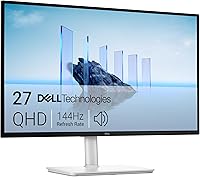
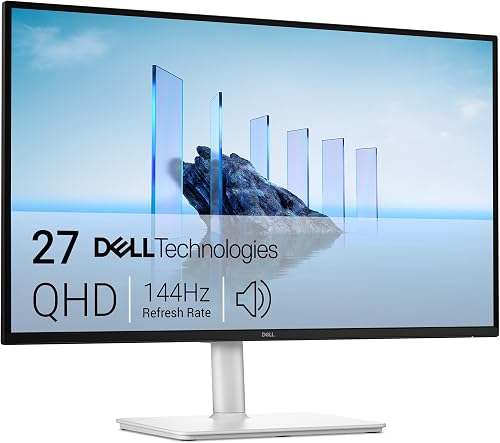
Dell S2725DC: Best for a balanced laptop desk
- 27-inch QHD IPS display
- USB-C power delivery up to 65W
- Height, tilt, pivot and swivel adjustment
- Built-in dual 3W speakers
The QHD screen gives a 27-inch laptop workspace more room for windows than Full HD. USB-C carries video and data while delivering up to 65W of power.
Pros
- QHD resolution
- 65W USB-C power delivery
- Four-way stand adjustment
Cons
- 65W may not meet every laptop's charging needs
- No built-in camera
The Dell S2725DC balances screen space and laptop connection features for a home office. Its 27-inch QHD IPS display has a 2560 x 1440 resolution, giving you more detail than Full HD without moving to 4K.
One USB-C connection supports video, data and up to 65W of power delivery. The monitor also has HDMI and DisplayPort, plus a quick access port with USB-C up to 15W and USB Type-A.
The stand adjusts for height, tilt, pivot and swivel, which gives you several ways to position the screen. Built-in dual 3W speakers can handle basic audio without a separate set of speakers.
Choose it if 65W meets your laptop's charging needs and QHD suits your work. If your laptop needs more power, compare it with the ViewSonic VP2766-2K below.
ViewSonic VP2766-2K: Best for higher USB-C power
- 27-inch QHD IPS display
- USB-C power delivery up to 90W
- 120Hz refresh rate
- Factory calibrated with 100% sRGB coverage
Its USB-C connection delivers up to 90W while carrying video and data, which suits laptops that need more charging power. The factory-calibrated 100% sRGB coverage also fits color work.
Pros
- Up to 90W USB-C power delivery
- 120Hz refresh rate
- Includes HDMI and USB-C cables
Cons
- Check laptop charging needs before relying on USB-C power
- Color tools may be more than basic office tasks require
The ViewSonic VP2766-2K suits laptop users who want up to 90W USB-C power delivery alongside a QHD screen. Its USB-C connection carries video and data as well as power, and its HDMI 2.1 port can connect a second device.
The 27-inch IPS display has a 2560 x 1440 resolution and a 120Hz refresh rate. ViewSonic also describes it as factory calibrated with 100% sRGB coverage and Pantone validation, which may help if color consistency matters in your work.
Its stand adjusts for height, tilt, swivel and portrait pivot. Four USB-C ports, USB-A, speakers and an included USB-C cable add flexibility to a desk setup.
Choose it if you need a higher USB-C power ceiling or do color-focused tasks. Confirm that 90W is suitable for your laptop and that your preferred connection supports the display mode you want.
ASUS ProArt PA278CV: Best for color-focused work
- 27-inch QHD IPS display
- USB-C power delivery up to 65W
- Calman Verified Delta E < 2 and 100% sRGB
- Height, tilt, swivel and pivot adjustment
The PA278CV pairs QHD workspace with stated color features for photo and video tasks. USB-C supports video, data and up to 65W of laptop power.
Pros
- Calman Verified Delta E < 2
- 100% sRGB and 100% Rec. 709 stated
- DisplayPort daisy-chaining
Cons
- 65W may be short of some laptop charging needs
- Its color features may be unnecessary for general office work
The ASUS ProArt PA278CV is the color-focused QHD option in this group. ASUS lists Calman Verified Delta E < 2, 100% sRGB and 100% Rec.
709 color coverage for creative work.
Its USB-C connection supports video, data and up to 65W of power delivery. The 27-inch QHD IPS screen provides 2560 x 1440 resolution, while DisplayPort daisy-chaining can support a multi-display arrangement.
The stand supports height, tilt, swivel and pivot adjustment, including portrait orientation. ASUS includes USB-C, HDMI and DisplayPort cables, so you have several connection options for a laptop or other device.
Choose it if you edit photos or video and want the stated color features. For general documents and browsing, the Dell offers a similar QHD workspace with built-in speakers and a 65W USB-C connection.
INNOCN 27 4K USB-C: Best for a 4K laptop workspace

- 27-inch 4K IPS display
- USB-C power delivery up to 65W
- Height, swivel and pivot adjustment
- HDR400
This 27-inch screen offers 4K resolution and USB-C power delivery up to 65W. Check your laptop's output and scaling preferences before choosing a 4K display.
Pros
- 4K resolution
- 65W USB-C power delivery
- Adjustable stand includes pivot
Cons
- 60Hz refresh rate
- 65W may not meet every laptop's charging needs
The INNOCN 27 4K USB-C is a fit if you want a 4K screen for laptop work. Its 27-inch IPS panel has a 3840 x 2160 resolution, and its USB-C connection supports up to 65W power delivery.
The stand supports height, swivel and pivot adjustment. It also has DisplayPort, HDMI and a 3.5 mm audio jack, so you can connect devices through more than one type of input.
At 27 inches, 4K provides finer detail than QHD, though you may want to adjust display scaling for readable text and comfortable window sizes. Check that your laptop supports the resolution and refresh rate you plan to use.
Choose this monitor if 4K detail is a priority and 65W meets your charging needs. If you want a similar 4K and USB-C combination with MultiView support, consider the Philips below.
Philips 27E1N5900R: Best for 4K with an ergonomic stand

- 27-inch 4K IPS display
- USB-C power delivery up to 65W
- Height, tilt and pivot adjustment
- MultiView dual-device support
The 4K panel and adjustable stand make this a fit for a detailed workspace. USB-C supports video, data and up to 65W charging for compatible laptops.
Pros
- 4K resolution
- 65W USB-C power delivery
- MultiView support
Cons
- Confirm USB-C compatibility with your laptop
- 60Hz refresh rate
The Philips 27E1N5900R pairs a 27-inch 4K IPS panel with USB-C power delivery up to 65W. Its USB-C connection carries video and data while charging compatible laptops.
The stand adjusts for height, tilt and pivot, and MultiView supports displaying two devices at once. Philips also includes LowBlue mode and flicker-free technology, along with HDMI and DisplayPort connections.
Like the INNOCN, this monitor suits laptop users who want 4K resolution. Confirm that your laptop supports the desired display mode and that its charging needs fit the monitor's 65W limit.
Choose Philips if the ergonomic stand and MultiView features fit your desk. If Full HD is enough for your work, the BenQ options below may be a simpler match.
BenQ GW2790TC: Best for Full HD and USB-C

- 27-inch IPS Full HD display
- USB-C connection
- 144Hz refresh rate
- Flicker-free and low blue light features
The GW2790TC combines Full HD resolution with USB-C and a 144Hz refresh rate. Its lower resolution can suit everyday documents, though text and windows have less detail than QHD or 4K.
Pros
- USB-C connection
- 144Hz refresh rate
- Flicker-free and low blue light features
Cons
- Full HD offers less workspace detail than QHD or 4K
- USB-C power delivery wattage is not specified
The BenQ GW2790TC is a Full HD option with USB-C and a stated 144Hz refresh rate. It may suit everyday office work where you want a straightforward screen and smooth motion without prioritizing QHD or 4K detail.
The product title describes a 27-inch monitor, while some feature text calls it 24 inches. Confirm the physical size before you buy, and check your laptop's USB-C charging needs because a power delivery wattage is not specified here.
BenQ includes flicker-free and low blue light features. The stand is described as height and tilt adjustable by the brand, giving you some control over positioning.
Choose it if Full HD resolution fits your workload and you value the stated refresh rate. If you prefer a simple Full HD option with HDMI and DisplayPort also available, compare the GW2790C.
BenQ GW2790C: Best for a simple Full HD setup

- 27-inch IPS Full HD display
- USB-C, HDMI and DisplayPort connections
- 144Hz refresh rate
- Low blue light feature
This BenQ keeps the screen choice simple with Full HD resolution and a USB-C connection. The stated power delivery wattage is not available, so verify charging support for your laptop.
Pros
- USB-C, HDMI and DisplayPort connections
- 144Hz refresh rate
- Tilt adjustment
Cons
- Full HD resolution
- USB-C power delivery wattage is not specified
The BenQ GW2790C offers a 27-inch Full HD IPS screen, USB-C connection and a 144Hz refresh rate. HDMI and DisplayPort are also identified among its connection options.
The product information describes tilt adjustment, low blue light and visual optimization features. It does not specify USB-C power delivery wattage, so treat the USB-C connection as a display connection until you confirm laptop charging support.
Full HD has fewer pixels than QHD or 4K on a 27-inch display. If you mostly use email, documents and a small number of windows, that may be enough; compare the text detail against the 1440p work monitor options if you want more workspace.
Choose it for a basic Full HD laptop setup where its connections match your computer. For a curved screen and built-in speakers, the SANSUI is another lower-resolution option.
SANSUI 27 Curved USB-C: Best for a curved screen on a budget

- 27-inch curved Full HD display
- USB-C connection
- 120Hz refresh rate
- Built-in dual 2W speakers
The curved screen, USB-C input and built-in speakers cover basic laptop desk needs. Its Full HD resolution provides less workspace detail than the QHD and 4K picks.
Pros
- Curved screen
- 120Hz refresh rate
- Built-in speakers
Cons
- Full HD resolution
- USB-C power delivery wattage is not specified
The SANSUI 27 Curved USB-C is the curved Full HD pick, with a 120Hz refresh rate and built-in dual 2W speakers. Its USB-C and HDMI inputs give you two connection types for a laptop or another device.
The screen has a 1920 x 1080 resolution, so it offers less detail than the QHD and 4K choices here. The stand tilts from -5 to 15 degrees, and the monitor supports a 100 x 100 mm VESA mount.
USB-C power delivery wattage is not specified, so check whether it charges your laptop before expecting a single-cable setup. The same check matters if you plan to use a USB-C hub for keyboard, mouse or storage devices.
Choose it if a curved screen and built-in speakers matter more than higher resolution or stand adjustments. For a laptop-first desk, the Dell or ViewSonic offer clearer USB-C power delivery information.
How much USB-C power does your laptop need?
Match the monitor's USB-C power delivery to the laptop's charging needs before you choose a one-cable setup. The Dell, ASUS, INNOCN and Philips support up to 65W, while the ViewSonic supports up to 90W.
A USB-C port does not always charge a laptop. The BenQ and SANSUI product information does not specify a power delivery wattage, so verify charging support with the seller or manufacturer before relying on that feature.
You can still use a monitor connection for video while charging the laptop separately. See our guide to USB-C vs HDMI for monitors if you are deciding between a single-cable connection and separate video and power cables.
Is QHD or 4K better for laptop office work?
QHD is a useful fit for many 27-inch office screens, while 4K suits buyers who want finer detail and can manage display scaling. The Dell, ViewSonic and ASUS offer QHD; INNOCN and Philips offer 4K.
A higher resolution can show more detail, but your laptop must support the screen mode you want. Text size also depends on operating system scaling and viewing distance, so consider how you prefer documents and menus to appear.
For another size and resolution comparison, read 27 vs 32 inches for office work. The right screen size depends on desk depth, viewing distance and how much of your work sits on screen at once.
What stand adjustments matter on a laptop monitor?
Height adjustment is useful when you need to align the screen with your seated eye level, while pivot can help with portrait documents or code. Among these picks, several stands include height adjustment, but the SANSUI only specifies tilt.
A laptop screen sits lower than many external monitors, so stand fit can affect how comfortably you move your gaze between screens. Check the monitor's adjustment range and your desk height before settling on a position.
If you plan to use the laptop screen beside the monitor, our guide to setting up dual monitors with a laptop explains the basic layout and connection decisions.
Which laptop home office monitor should you choose?
Choose the Dell S2725DC if you want a balanced 27-inch QHD monitor with clear 65W USB-C charging support and a flexible stand. Pick the ViewSonic if you need up to 90W, the ASUS if color accuracy features matter, or one of the 4K models if finer detail is your priority.
For MacBook-specific choices, compare our best monitors for a MacBook Air. Check your laptop's charging requirements, video output and preferred resolution before deciding.
Our top 3 picks at a glance
-
1
-
2
-
3
Frequently asked questions
What should you look for in a monitor for a laptop home office?
Start with the laptop connection. USB-C can carry video and data, and some monitors also deliver power, but check the wattage against your laptop's needs.
Then choose a screen resolution and stand that suit your desk and daily work.
QHD is a useful middle ground for a 27-inch workspace; 4K gives more detail.
Can a USB-C monitor charge a laptop?
Yes, if the monitor supports USB-C power delivery and your laptop accepts charging over USB-C. The Dell S2725DC, for example, supports up to 65W, while the ViewSonic VP2766-2K supports up to 90W.
Check the laptop's required wattage and USB-C capabilities before relying on one cable.
Is a 27-inch Full HD monitor good for office work?
A 27-inch Full HD monitor can work for documents, email and general tasks, but it shows less detail than a QHD or 4K screen of the same size. If you keep several windows open or read small text, compare the tradeoffs in our 27-inch resolution guide.
Your viewing distance and scaling preference also matter.
Should you choose a 4K monitor for a laptop?
Choose 4K if you want finer image detail and your laptop can drive the display at your preferred resolution and refresh rate. The INNOCN and Philips picks here are 27-inch 4K options with USB-C power delivery up to 65W.
For a simpler comparison, see 4K vs 1440p for office work.